4. Publish Umami
One process on two hostnames: the tracking script open to the world, the dashboard behind your org login.
4.0 Why
Umami has to be reachable by two audiences with nothing in common. Every visitor's browser must fetch /script.js and POST to /api/send, and those visitors will never have a login on your organisation. You, looking at the numbers, want the opposite: nobody else in the dashboard.
Auth is a property of the hostname, not of a path, so this is not one decision with a compromise. You publish the same port twice in a split-surface publish (see Glossary). The tracking hostname gets None because anonymous browsers must reach it. The dashboard hostname gets org because only you should. One process, two hostnames, two auth modes.
This chapter also has an honest limitation in it, in 4.5, about the visitor country column. It is a consequence of how Edgible works and it is not configurable away.
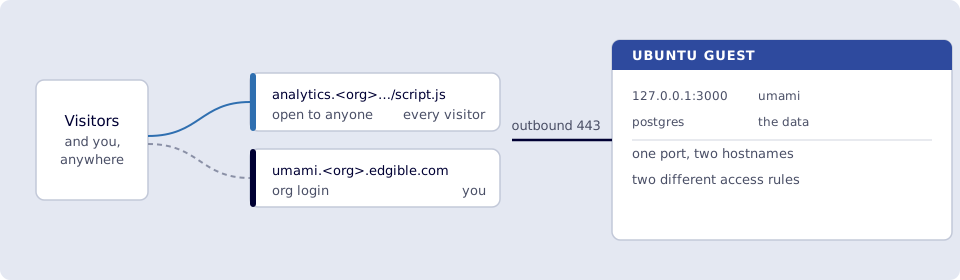
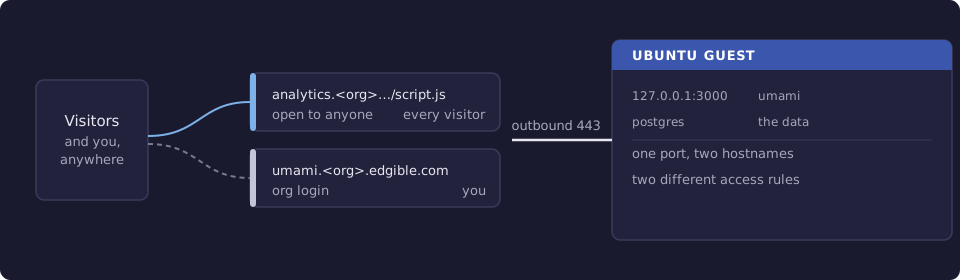
Where you run this: edgible on the Ubuntu guest, the console in the host browser, the tracking snippet wherever you edit your site, the final check on a phone on cellular.
4.1 The job
You create two Edgible apps against port 3000, add the tracking snippet to your site pointing at the None hostname, and watch your own visit appear in the dashboard on the org hostname.
Done when
edgible app listshowsanalytics(None) andumami(org), both on port3000.curl https://analytics.<org>.edgible.com/script.jsreturns JavaScript with no login.- Opening
https://umami.<org>.edgible.comasks for the Edgibleorglogin first. - Your site's HTML contains the snippet with the
analyticshost and your website ID. - A visit from a phone on cellular appears in the dashboard's Realtime view.
- Ports
3000and8080are still bound to127.0.0.1and not forwarded.
Need first: 3. Umami on the VM, with the heartbeat answering on 127.0.0.1:3000, the default password changed, and your website ID copied. The site from 2. Publish the site still published.
Not this chapter: uptime monitoring or teardown. A custom domain works here exactly as in 2.6, if you want the tracking script on your own name.
4.2 Publish the tracking hostname (None)
edgible app create existing
| Prompt | Answer |
|---|---|
| Application name | analytics |
| Upgrade protocol from HTTP to HTTPS? | Yes (if asked) |
| Custom domains / additional hostnames | leave blank (Enter) |
| How should access to this application be protected? | None (public access) |
| Use Edgible managed gateway? | Yes (if asked) |
| Select serving device | minipc |
| Select local workload | umami |
| Select port | 3000 |
Wait for the certificate in the console, as in chapter 2, then from the guest:
curl -sI https://analytics.<org>.edgible.com/script.js
A 200 with a JavaScript content type. No login, which is the point: a stranger's browser has to be able to do exactly this.
Be clear about what None exposes here. This hostname serves the whole Umami process, including its login page, so the internet can reach that page. What protects it is Umami's own password, which is why 3.3 changed it before anything was published. The next app is what gives you a way in that a stranger cannot even see.
4.3 Publish the dashboard hostname (org)
The same command, the same port, a different name and a different answer to one prompt:
edgible app create existing
| Prompt | Answer |
|---|---|
| Application name | umami |
| Upgrade protocol from HTTP to HTTPS? | Yes (if asked) |
| Custom domains / additional hostnames | leave blank (Enter) |
| How should access to this application be protected? | org |
| Use Edgible managed gateway? | Yes (if asked) |
| Select serving device | minipc |
| Select local workload | umami |
| Select port | 3000 |
Smoke test. Open https://umami.<org>.edgible.com in the host browser. You get the Edgible org login before you ever see Umami. Sign in with the account from Start here, then sign in to Umami itself with the password you set in 3.3. Two logins, because the two systems do not share accounts.
Now confirm the split does what it claims. In a private window, open the same URL. You should be stopped at the Edgible login and never reach Umami. Then open https://analytics.<org>.edgible.com/script.js in that same private window and watch it return JavaScript. Same process, same port, different rules, decided by which hostname you asked for.
4.4 Add the snippet to your site
In your site's HTML, inside <head>, using your tracking hostname and the website ID from 3.4:
<script defer src="https://analytics.<org>.edgible.com/script.js"
        data-website-id="YOUR-WEBSITE-ID"></script>
Put this in the source your generator uses, not only in the built output, or the next build will drop it. Then deploy as in 2.5:
rsync -av --delete -e 'ssh -p 2222' ./dist/ ubuntu@127.0.0.1:~/site/public/
Smoke test. On a phone with Wi‑Fi off, load https://site.<org>.edgible.com. Then open the dashboard on https://umami.<org>.edgible.com and look at Realtime. Your visit shows up within a few seconds.
If nothing arrives, check in this order. View source on the public site and confirm the snippet is actually there, since a stale build is the usual cause. Confirm the src host is the analytics hostname and not 127.0.0.1. Then, on the guest, confirm the ingest path itself works:
curl -sS -X POST https://analytics.<org>.edgible.com/api/send \
  -H "Content-Type: application/json" \
  -H "User-Agent: Mozilla/5.0" \
  -d '{"type":"event","payload":{"website":"YOUR-WEBSITE-ID","hostname":"test","url":"/"}}'
{"beep":"boop"} means Umami accepted it, and the problem is in the page rather than in the publishing.
4.5 What the country column will not tell you
Visits will arrive with browser and operating system filled in and with Country and Region empty. This is not a misconfiguration and no environment variable fixes it.
Umami reads the visitor's IP address from a forwarded header to look up a location. Edgible terminates TLS on your own device, which is the property that keeps the platform out of your traffic: the gateway relays bytes it cannot read, so it cannot add an X-Forwarded-For header, because it never sees the HTTP request at all. Umami therefore sees the address of the Edgible hop rather than the visitor, and declines to guess a country from it.
You can prove the software is fine, and that the missing piece is the header, by supplying one by hand on the guest:
curl -sS -X POST http://127.0.0.1:3000/api/send \
  -H "Content-Type: application/json" \
  -H "User-Agent: Mozilla/5.0" \
  -H "x-forwarded-for: 8.8.8.8" \
  -d '{"type":"event","payload":{"website":"YOUR-WEBSITE-ID","hostname":"test","url":"/geo-test"}}'
That visit lands with a country against it. Everything except location works normally: page views, referrers, browsers, devices, and every trend over time.
If geography genuinely matters to you, the options are to put a proxy you control in front of the ingest hostname so that it can set the header, or to use a hosted ingest endpoint and keep only the dashboard self-hosted. Both trade away part of the reason you self-hosted analytics, so decide whether the column is worth it before adding the moving part.
Verify
-
edgible app listshowsanalytics(None) andumami(org), both port3000. -
curl https://analytics.<org>.edgible.com/script.jsreturns JavaScript with no login. -
https://umami.<org>.edgible.comasks for the Edgibleorglogin first, in a private window. - The public site's HTML contains the snippet with the
analyticshost. - A visit from a phone on cellular appears in the dashboard's Realtime view.
- Ports
3000and8080are still bound to127.0.0.1and not forwarded.
Next
5. Uptime monitoring with Uptime Kuma watches the public hostname from the same box and tells you when it stops answering. Series: README.