3. The assistant card
A chat over your own documents, and the model that answers, written as one card.
3.0 Why
A hosted chat answers from files you upload to someone else. This chapter publishes the other arrangement: Open WebUI and Ollama on a machine you own. The chat is org. The model is api-key. The assistant card is that pattern. There is no earlier series to tear down first.
Both apps are place desk. This chapter maps that place to minipc. Open WebUI calls Ollama on the machine. The sample document stays a file you upload after the chat is published.
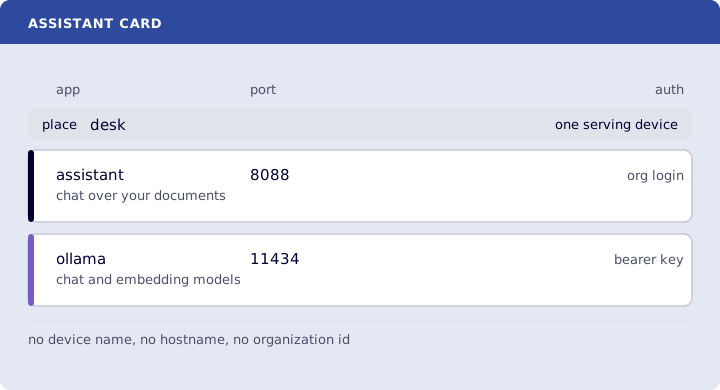
Where you run this: the serving device that will hold the model. A 4 GB guest cannot. qwen2.5:7b needs room on the order of 8 GB free, with Open WebUI beside it. The assistant card fetches the Compose file Open WebUI publishes and runs tailor.sh.
3.1 The job
You fetch the assistant card, follow its README, generate ~/assistant.stack.yml from the card, deploy it, and ask one question of the sample document.
Done when
~/assistant-card.ymllistsassistanton port8088withorg, andollamaon port11434withapi-key.assistantnamesghcr.io/open-webui/open-webui:main.ollamanamesollama/ollama:latest.- The card has no
deviceName, no<org>.edgible.comhostname, and no organization id. - Both applications name the Open WebUI Compose URL and the same
changes. - Both have
place: desk. ssshows127.0.0.1:8088and127.0.0.1:11434.edgible stack validate -f ~/assistant.stack.ymlreports 2 applications:assistant,ollama.edgible app listshowsassistantwithorgandollamawithapi-key.- In the assistant, "what are the support hours?" is answered with weekdays 9 to 5.
Need first: Start here, so a serving agent is installed on the machine that will hold the model. hello-world can stay. Port 8088 is free. The website card's site uses 8080, so the two can run on one machine.
Not this chapter: a second copy of the card, a public chat with no login, or a separate vector database. The file is cards/assistant/card.yml. card-to-stack.py writes the stack file from that card. Your own PDFs are the same upload, after the sample works.
3.2 Fetch the assistant card
The field meanings are the same as The website card. The files and the model pulls are on the assistant card.
On the serving device:
curl -fsSL https://raw.githubusercontent.com/Edgible/cards/main/cards/assistant/card.yml -o ~/assistant-card.yml
org in the file is the auth mode org. api-key is the auth mode api-key. from is the image name. place is desk on both apps, so they stay on one serving device. The Compose URL is the file Open WebUI publishes. changes is the edit list. tailor.sh applies that list.
3.3 Start the containers
Follow the assistant card. It fetches the Open WebUI Compose file and sample-help.pdf, and runs tailor.sh.
Start it, then pull the models:
docker compose -f ~/assistant/docker-compose.yaml up -d
docker exec ollama ollama pull qwen2.5:7b
docker exec ollama ollama pull nomic-embed-text
ss -ltnp | grep 8088
ss -ltnp | grep 11434
docker exec ollama ollama ls
The pulls are large.
127.0.0.1:8088 and 127.0.0.1:11434 are listening. ollama ls lists qwen2.5:7b and nomic-embed-text.
3.4 Generate the stack file and deploy it
The ports from 3.3 are listening. edgible stack deploy reads a stack file, and each app in it is pre-existing, so deploy publishes those ports. card-to-stack.py writes that file from the card. It reads ~/assistant-card.yml, takes the organization id from edgible config get organizationId, and writes one Application document per app. --device minipc places both on the serving device from Start here. Auth mode org in the card is written edgible-login in the stack file. Auth mode api-key stays api-key.
curl -fsSL https://raw.githubusercontent.com/Edgible/cards/main/tools/card-to-stack.py -o ~/card-to-stack.py
python3 ~/card-to-stack.py ~/assistant-card.yml --device minipc > ~/assistant.stack.yml
edgible stack validate -f ~/assistant.stack.yml
edgible stack deploy -f ~/assistant.stack.yml
edgible app list
The report says 2 applications, assistant and ollama, each pre-existing. edgible app list shows assistant with org and ollama with api-key.
3.5 Ask the sample document
The hostname exists now. The assistant card is the rest: sign in with org, create the Open WebUI admin, set the embedding model to nomic-embed-text, upload sample-help.pdf, and attach that collection to the chat model.
Ask: what are the support hours? The answer is the sentence in the sample. Support hours are weekdays 9 to 5.
Verify
-
grep -nE 'name: (assistant|ollama)|port:|authModes:' ~/assistant-card.ymlshowsassistanton port8088withorg, andollamaon port11434withapi-key. -
grep -n 'from:' ~/assistant-card.ymlshowsghcr.io/open-webui/open-webui:mainandollama/ollama:latest. -
grep -nE 'deviceName|organization' ~/assistant-card.ymlprints nothing. -
grep -n 'edgible.com' ~/assistant-card.ymlprints nothing. -
grep -n 'compose:' ~/assistant-card.ymlshowshttps://raw.githubusercontent.com/open-webui/open-webui/main/docker-compose.yamlunder both apps. -
grep -n 'changes:' -A3 ~/assistant-card.ymlshows the build block,127.0.0.1:8088, and127.0.0.1:11434under both apps. -
grep -n 'place:' ~/assistant-card.ymlshowsdeskfor both. -
ss -ltnp | grep 8088shows127.0.0.1:8088.ss -ltnp | grep 11434shows127.0.0.1:11434. -
edgible stack validate -f ~/assistant.stack.ymlreports 2 applications:assistant,ollama. -
edgible app listshowsassistantwithorgandollamawithapi-key. - In the assistant, "what are the support hours?" is answered with weekdays 9 to 5.
Next
Self Hosting is Social. The website card is The website card. The n8n card is The n8n card.