2. Publish the site
Your own pages on a public HTTPS hostname, with the router untouched.
2.0 Why
The site answers on 127.0.0.1:8080, which is useful to nobody but you. This chapter gives it a hostname anyone can open. The comparison worth holding in mind: the usual way to do this is to rent a box and copy the files to someone else's disk, or to forward port 80 and inherit certificates and dynamic DNS as ongoing work. Here the files stay on your machine, the router stays as it is, and the certificate is issued for you.
The hostname you get is site.<org>.edgible.com — zero-DNS publish on first create: certificate and routing in place with no DNS step (see Glossary). It is worth knowing from the outset that this is not the final word on the address. A site hosted on the machine under your desk can answer at www.example.com instead, with a certificate issued for that name, so a visitor has no way to tell where it is served from. What that costs you is one DNS record: a CNAME from your name to the Edgible hostname, which means you need a domain whose DNS you can edit. That is the optional 2.6 at the end of this chapter.
This is also the chapter where the auth mode is genuinely None and that is the correct answer, not a shortcut. A marketing site is meant to be read by strangers, including ones who will never have a login. Later chapters in this series publish two things that are not meant to be public, so you will see the same command with a different answer.
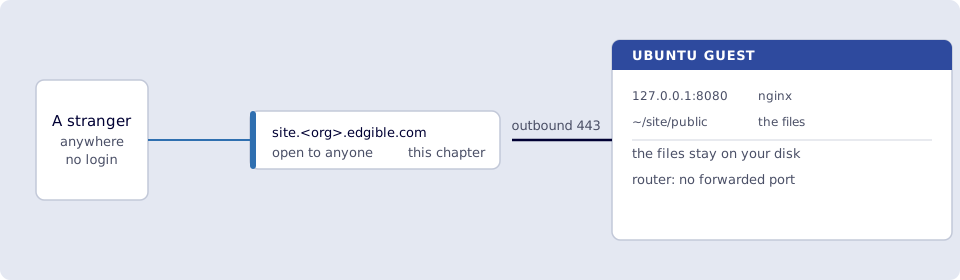
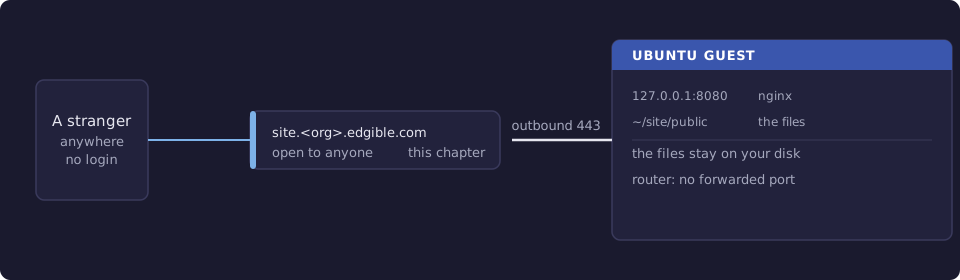
Where you run this: edgible on the Ubuntu guest, the console in the host browser, the final check on a phone on cellular.
2.1 The job
You create an Edgible app pointing at port 8080 with auth mode None, wait for the certificate, and load the site on a phone with Wi‑Fi off.
Done when
edgible app listshows an app namedsitewith asite.<org>.edgible.comURL.- The console shows that app's certificate as issued.
curl https://site.<org>.edgible.com/from the guest returns your page.- The site loads on a phone on cellular.
ss -ltnp | grep 8080still shows127.0.0.1:8080, and the port is still not forwarded on the router.- If you do the optional 2.6: your own domain resolves to the Edgible hostname and loads the site over HTTPS.
Need first: 1. The site on the VM, so curl http://127.0.0.1:8080/ returns your page. Leave that container and hello-world running.
Not this chapter: analytics or uptime monitoring. A domain of your own is optional and comes at the end, in 2.6.
2.2 Create the app
The nginx container from chapter 1 is already listening on 8080, so this is an existing app and there is no YAML to write:
edgible app create existing
Answer the prompts like this:
| Prompt | Answer |
|---|---|
| Application name | site |
| Upgrade protocol from HTTP to HTTPS? | Yes (if asked) |
| Custom domains / additional hostnames | leave blank (Enter) |
| How should access to this application be protected? | None (public access) |
| Use Edgible managed gateway? | Yes (if asked) |
| Select serving device | minipc |
| Select local workload | site (the nginx container) |
| Select port | 8080 |
The CLI prints the application URL, of the shape https://site.<org>.edgible.com. Copy the exact host it prints.
None here means Edgible does not put a login in front of the hostname. It does not mean the box is exposed: the only thing reachable is port 8080 on that guest, because that is the one port this app names. Nothing else on the machine gained a route in.
2.3 Wait for the certificate
First publish usually takes 30 to 90 seconds. Watch it in the console rather than retrying the URL:
- In the host browser, open https://app.prod.edgible.com/.
- Open the
siteapplication. - Find the Certificates section and wait for issued (or the equivalent ready state).
Then, on the guest:
edgible app list
curl -sS https://site.<org>.edgible.com/ | head -5
You should see your HTML. If curl complains about the certificate, wait and refresh Certificates in the console. Do not work around it with http:// or -k: a certificate error here means the certificate is not ready, and both of those hide the one thing you are checking.
2.4 Load it from a phone
Smoke test. The page must load when you are nowhere near your own network.
- On the phone, turn Wi‑Fi off so you are on cellular.
- Open
https://site.<org>.edgible.com. - You should see the same page
curlreturned on the guest.
That page came off a disk in your house, over a connection your machine opened. The router still has no forwarded port. Confirm that from the guest, because it is the claim worth checking rather than assuming:
ss -ltnp | grep 8080
Still 127.0.0.1:8080. Nothing is listening for the internet.
2.5 Updating the site
Because chapter 1 bind-mounted the directory, publishing a change is a copy. From your laptop:
rsync -av --delete -e 'ssh -p 2222' ./dist/ ubuntu@127.0.0.1:~/site/public/
Then hard-refresh the public URL. No rebuild, no container restart, no Edgible command: the app points at a port, and what that port serves is your business. Delete a file and it is gone from the site, which is what --delete is for and also why it is worth having the site in version control somewhere.
2.6 A domain of your own (optional)
site.<org>.edgible.com is a working public address, and for a demo it is enough. A site you hand to customers usually wants your own name on it. Edgible supports custom domains, so the shape is: your domain points at the Edgible hostname, and the app knows to answer for it.
You need a domain of your own and access to its DNS. A name under edgible.com will not do: that whole zone is reserved for the hostnames Edgible generates, such as site.<org>.edgible.com, so Edgible refuses any other name in it, even one that looks free. Then:
- Add the hostname to the app. It is the Custom domains / additional hostnames prompt you left blank in 2.2, and the same field is on the application in the console. Enter the name you want, for example
www.example.com. - At your DNS provider, create a
CNAMErecord from that name to the hostname Edgible issued:
www.example.com. CNAME site.<org>.edgible.com.
- Wait for DNS to propagate, then for Edgible to issue a certificate for the new name. The console shows the certificate the same way it did in 2.3.
Smoke test. From the guest, check the name resolves to the Edgible hostname and then that it serves your site:
dig +short www.example.com
curl -sSI https://www.example.com/ | head -1
The first prints the site.<org>.edgible.com target. The second is a 200 with no certificate complaint. Then load it on the phone, on cellular, the same as 2.4.
One constraint comes from DNS rather than from Edgible: a CNAME cannot sit at the apex of a domain, so example.com with no subdomain needs a provider offering ALIAS or ANAME flattening. The usual answer is to publish www.example.com and have the apex redirect to it, which most registrars and DNS providers offer as a setting.
Verify
-
edgible app listshowssitewith asite.<org>.edgible.comURL. - The console shows that app's certificate as issued.
-
curl https://site.<org>.edgible.com/from the guest returns your page. - The site loads on a phone on cellular.
-
ss -ltnp | grep 8080still shows127.0.0.1:8080, and the port is not forwarded on the router. - If you did 2.6:
dig +short www.example.comreturns the Edgible hostname, and the site loads on your own domain over HTTPS.
Next
3. Umami on the VM adds analytics, self-hosted beside the site, so visitor data lands on your disk rather than someone else's. Series: README.