2. Java players over TCP
A friend on a PC joins your server at mc-java.<org>.edgible.com, with no port forwarded.
2.0 Why
Every other series in these guides publishes a website, an interface or an API, which all speak HTTPS. A Minecraft Java client speaks its own protocol over plain TCP. Edgible publishes that too: an app with protocol tcp carries the connection byte for byte to a port on your machine, over the same outbound connection the serving agent already holds.
Two things are different from an HTTPS app, and this chapter shows both. A TCP app has no auth mode, because a game connection has no browser to sign in with. And a TCP app needs a public port, which Edgible takes from a fixed range.
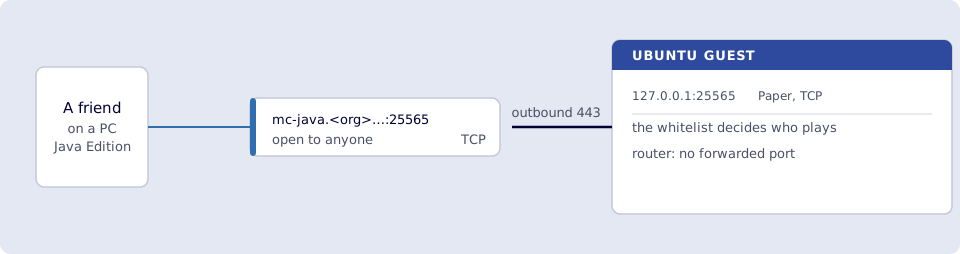
Where you run this: edgible and the outside check on the Ubuntu guest, the join on a PC with Minecraft Java Edition, ideally a friend's on another network.
2.1 The job
You publish port 25565 as a TCP app called mc-java, check from outside that it answers, and have a friend join.
Done when
edgible app listshowsmc-javawith protocoltcpand the addressmc-java.<org>.edgible.com:25565.mc-monitor statusagainstmc-java.<org>.edgible.comport25565printsversion=Paper.- A friend on another network adds
mc-java.<org>.edgible.comas a server and joins. - A player who is not on the whitelist is turned away.
- Port
25565is still bound to127.0.0.1and not forwarded.
Need first: 1. Minecraft on the VM, with mc-monitor status answering on 25565, online mode and the whitelist on, and your friends added. The serving device is minipc.
Not this chapter: Bedrock players, which is chapter 3, or a custom domain.
2.2 Publish the Java port
A TCP app is created from flags. You need the id of the serving device:
edgible device list
Copy the id of minipc, then:
edgible app create existing \
  --non-interactive \
  --name mc-java \
  --port 25565 \
  --protocol tcp \
  --auth-modes none \
  --device-id <minipc-device-id>
--auth-modes none is the only value a TCP app accepts. With org the CLI stops with canonical tcp/udp access entries have no auth policy, because there is no browser request to attach a login to.
Smoke test. On the guest:
edgible app list
mc-java shows "protocol": "tcp" and the address mc-java.<org>.edgible.com:25565. The public port is the local one, 25565.
2.3 Check it from outside
The check uses mc-monitor again, this time from a fresh container that goes out to the internet and back in through Edgible, the way a friend's game does. On the guest:
docker run --rm itzg/mc-monitor status --host mc-java.<org>.edgible.com --port 25565
mc-java.<org>.edgible.com:25565 : version=Paper 26.2 online=0 max=20 motd='Game night'
That answer went from the guest to the Edgible gateway and back down the serving agent's outbound connection to 127.0.0.1:25565. If it fails with could not connect, give the new hostname a minute and try again; edgible app list shows when the app is deployed.
2.4 A friend joins
On a PC with Minecraft Java Edition, ideally on another network:
- Open Multiplayer, then Add Server.
- Server Address:
mc-java.<org>.edgible.com. Java's default port is25565, so the address alone is enough. - Select the server and Join Server.
The server list shows the message Game night and the player count before anyone joins, which is the same status mc-monitor read. A friend on the whitelist lands in the world. Anyone else is disconnected with a message that they are not on the whitelist, which is the check that the server, not Edgible, decides who plays.
Be clear about what is reachable. A TCP app has no auth mode, so anyone who has the address can reach the server and see its status. What keeps them out of the world is online mode, which rejects an account that is not real, and the whitelist, which rejects an account that is not invited. Both were turned on in 1.4, before this chapter published anything.
2.5 When port 25565 is taken
A TCP or UDP app needs a public port on the Edgible gateway, from 20000 to 29999. 25565 is in that range, which is why this chapter could use it unchanged. But one app holds a public port on its gateway at a time, and 25565 is a popular one. If another app already has it, the create in 2.2 stops with:
Port 25565 for access "main" is already in use on the assigned gateway; choose a different listenPort.
The fix is a different host port, leaving the server on 25565 inside the container. In ~/minecraft/docker-compose.yml, change the Java line to another free port in the range, such as 25566:
- "127.0.0.1:25566:25565"
Then docker compose up -d in ~/minecraft, and publish with --port 25566. Friends then add the address with the port, mc-java.<org>.edgible.com:25566, because it is no longer the default. Use that port in 2.3 and in every check after it.
Verify
-
edgible app listshowsmc-javawith protocoltcpandmc-java.<org>.edgible.com:25565. -
docker run --rm itzg/mc-monitor status --host mc-java.<org>.edgible.com --port 25565printsversion=Paper. - A friend on another network joined from Multiplayer.
- A player who is not on the whitelist was disconnected with the whitelist message.
-
ss -ltnp | grep 25565still shows127.0.0.1:25565, and the port is not forwarded.
Next
3. Bedrock players over UDP publishes Geyser's port as a UDP app, so friends on phones join the same world. Series: README.