1. Minecraft on the VM
One Minecraft server on loopback, ready for Java players over TCP and Bedrock players over UDP.
1.0 Why
A game server you want to share has two audiences that do not run the same game. Friends on a PC play Java Edition, which connects over TCP on port 25565. Friends on a phone play Bedrock Edition, which connects over UDP on port 19132. Two separate servers would mean two worlds, and your friends would not meet.
Geyser fixes that. It is a plugin that runs inside a Java server and answers Bedrock players on UDP, translating as they play, so everyone lands in the same world. Floodgate, its companion plugin, lets Bedrock players in without also owning a Java account.
This chapter runs that server on the guest, on loopback, and stops there. Nothing is published yet. Before anything is, the server should already decide who may play, so this chapter also turns on online mode and a whitelist.
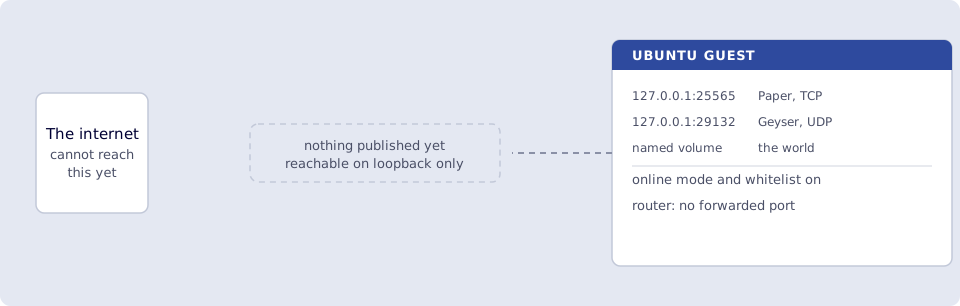
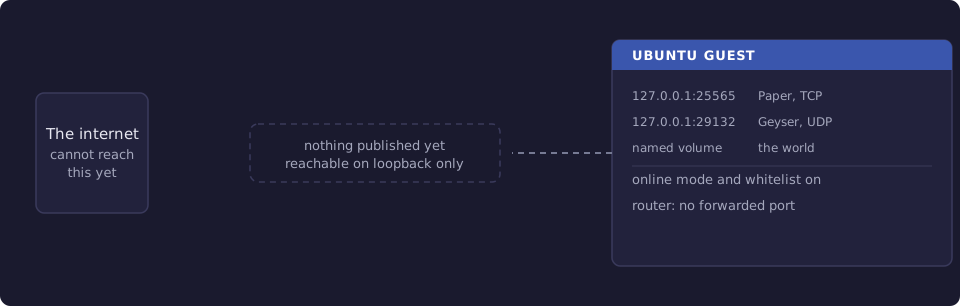
Where you run this: everything on the Ubuntu guest.
1.1 The job
You run a Paper server with the Geyser and Floodgate plugins in Docker Compose, switch Geyser to Floodgate sign-in, turn on the whitelist, and check both protocols from inside the container.
Done when
docker compose -f ~/minecraft/docker-compose.yml psshowsminecraftrunning and healthy.docker exec minecraft mc-monitor statusprintsversion=Paper.docker exec minecraft mc-monitor status-bedrock --host 127.0.0.1 --port 19132prints a version.grep auth-typeon Geyser's config showsfloodgate.server.propertiesshowsonline-mode=trueandwhite-list=true.ssshows127.0.0.1:25565on TCP and127.0.0.1:29132on UDP.- Neither port is forwarded on the router.
Need first: Start here, with the serving device minipc healthy and Docker installed. Leave hello-world running. The server takes 2 GB of memory, so the guest wants 4 GB.
Not this chapter: an Edgible app for either edition. Chapter 2 publishes Java, chapter 3 publishes Bedrock.
1.2 Run the server
On the guest:
mkdir -p ~/minecraft
cat > ~/minecraft/docker-compose.yml <<'YAML'
services:
  minecraft:
    image: itzg/minecraft-server:latest
    container_name: minecraft
    restart: unless-stopped
    ports:
      - "127.0.0.1:25565:25565"
      - "127.0.0.1:29132:19132/udp"
    environment:
      EULA: "TRUE"
      TYPE: PAPER
      MEMORY: 2G
      MOTD: "Game night"
      ENABLE_WHITELIST: "TRUE"
      PLUGINS: |
        https://download.geysermc.org/v2/projects/geyser/versions/latest/builds/latest/downloads/spigot
        https://download.geysermc.org/v2/projects/floodgate/versions/latest/builds/latest/downloads/spigot
    volumes:
      - minecraft-data:/data
volumes:
  minecraft-data:
YAML
A few lines in there are decisions, not defaults:
EULA: "TRUE"accepts the Minecraft End User License Agreement. The server will not start without it, so read it before you set it.TYPE: PAPERruns Paper, a Java server that loads plugins. Geyser and Floodgate are plugins, andPLUGINSdownloads both from the GeyserMC project on first start.ENABLE_WHITELISTturns the whitelist on, and the image enforces it, so only players on the list get in. 1.4 adds your friends.- Online mode is not in the file because it is already on: every Java player's account is checked against Minecraft's account service. Leave it that way.
- The Bedrock line maps host port
29132to Geyser's19132inside the container. Bedrock's usual port is19132, but chapter 3 explains why the published port has to be29132, and it is simplest to use that number on the host from the start.
Start it:
cd ~/minecraft && docker compose up -d
docker compose ps
The first start downloads the server, builds the world and fetches both plugins, so minecraft may sit at starting for a minute or two. docker compose logs -f minecraft shows the progress. It is ready when the log shows Started Geyser on UDP port 19132 and then Done.
Smoke test. On the guest:
docker exec minecraft mc-monitor status
docker exec minecraft mc-monitor status-bedrock --host 127.0.0.1 --port 19132
mc-monitor ships in the image and speaks each edition's own status protocol. The first line answers over TCP:
localhost:25565 : version=Paper 26.2 online=0 max=20 motd='Game night'
The second answers over UDP, from Geyser:
127.0.0.1:19132 : version=26.52 online=0 max=20
Your version numbers will be newer. What matters is that both answer.
1.3 Let Bedrock players sign in through Floodgate
Geyser starts with auth-type: online, which would ask every Bedrock player for a Java account too. Floodgate is installed so they do not need one, but Geyser has to be told to use it. On the guest:
docker exec minecraft sed -i 's/auth-type: online/auth-type: floodgate/' /data/plugins/Geyser-Spigot/config.yml
docker exec minecraft grep auth-type /data/plugins/Geyser-Spigot/config.yml
docker compose -f ~/minecraft/docker-compose.yml restart
The grep prints auth-type: floodgate. The file lives in the named volume, so the setting survives restarts and new images.
1.4 Friends only
Check that the two protections are on:
docker exec minecraft grep -E '^(online-mode|white-list|enforce-whitelist)=' /data/server.properties
enforce-whitelist=true
online-mode=true
white-list=true
Then add the people you will invite. A Java player goes on the whitelist by their Minecraft name:
docker exec minecraft rcon-cli whitelist add <java-name>
docker exec minecraft rcon-cli whitelist list
A Bedrock player goes on Floodgate's whitelist by their Xbox gamertag:
docker exec minecraft rcon-cli fwhitelist add <gamertag>
rcon-cli sends a command to the running server, so there is no restart. Add yourself too, or you will be turned away from your own server in chapter 2.
Smoke test. On the guest:
ss -ltnp | grep 25565
ss -lunp | grep 29132
TCP on 127.0.0.1:25565 and UDP on 127.0.0.1:29132. The 127.0.0.1: prefix in the compose file is what keeps both off the rest of your network, and it matters for a game server: before Edgible is involved, nothing should reach these ports except this machine.
Verify
-
docker compose -f ~/minecraft/docker-compose.yml psshowsminecraftrunning and healthy. -
docker exec minecraft mc-monitor statusprintsversion=Paper. -
docker exec minecraft mc-monitor status-bedrock --host 127.0.0.1 --port 19132prints a version. -
docker exec minecraft grep auth-type /data/plugins/Geyser-Spigot/config.ymlshowsauth-type: floodgate. -
/data/server.propertiesshowsonline-mode=trueandwhite-list=true, andwhitelist listshows the friends you added. -
ssshows127.0.0.1:25565on TCP and127.0.0.1:29132on UDP. - Neither port is forwarded on the router.
Next
2. Java players over TCP publishes port 25565 as a TCP app, and a friend on a PC joins. Series: README.