3. Bedrock players over UDP
A friend on a phone joins the same world at mc-bedrock.<org>.edgible.com, port 29132, over UDP.
3.0 Why
Chapter 2 let PC players in. Most of the people you might play with are on a phone or a tablet, and those run Bedrock Edition, which does not speak TCP at all. It connects over UDP, a protocol with no connection to hold open, just packets sent back and forth.
Geyser has been answering Bedrock players on UDP inside the container since chapter 1. This chapter publishes that port as a UDP app, so a phone anywhere reaches the same server, and the same world, as the PC players. The machine is now one TCP app and one UDP app at once.
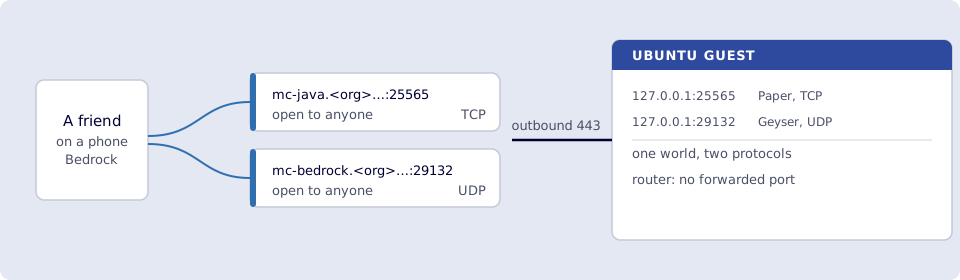
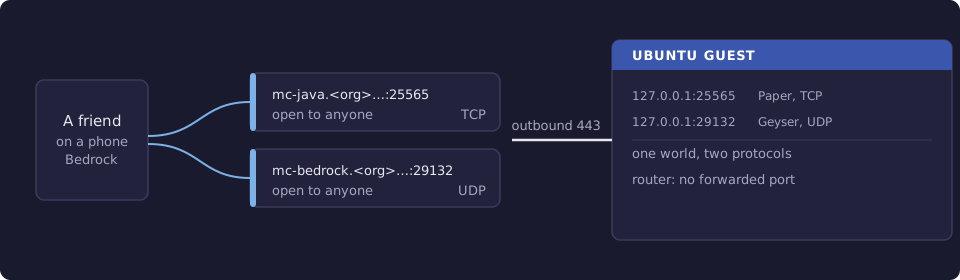
Where you run this: edgible and the outside check on the Ubuntu guest, the join on a phone or tablet with Minecraft (Bedrock Edition), ideally on cellular.
3.1 The job
You publish UDP port 29132 as an app called mc-bedrock, check from outside that it answers, and have a friend on a phone join the world your PC friends are in.
Done when
edgible app listshowsmc-bedrockwith protocoludpand the addressmc-bedrock.<org>.edgible.com:29132.mc-monitor status-bedrockagainstmc-bedrock.<org>.edgible.comport29132prints a version.- A friend on a phone, on cellular, adds the server with port
29132and joins. - That friend and a Java player from chapter 2 see each other in the same world.
- Port
29132is still bound to127.0.0.1and not forwarded.
Need first: 2. Java players over TCP, with mc-java published. From 1. Minecraft on the VM: Geyser answering on 127.0.0.1:29132, auth-type: floodgate, and the friend's gamertag on Floodgate's whitelist. The serving device is minipc.
Not this chapter: consoles, which 3.5 explains, or teardown.
3.2 Why the port is 29132
Bedrock's usual port is 19132, and Geyser listens on it inside the container. But a TCP or UDP app needs a public port from 20000 to 29999 on the Edgible gateway, and the public port is the one you publish. Publishing 19132 stops with:
access "main" listenPort 19132 is outside the allowed public L4 port range 20000-29999; the shared managed gateway only opens and arbitrates ports in that range.
That is why the compose file from chapter 1 maps the host port 29132 to the container's 19132:
- "127.0.0.1:29132:19132/udp"
Geyser does not need to know: it still listens on 19132, and Docker forwards 29132 on the host to it. Players type 29132 when they add the server, which Bedrock asks for anyway. As with 25565 in 2.5, one app holds a public port on its gateway at a time. If 29132 is taken, pick another port in the range, change the host side of that line, and publish that.
3.3 Publish the Bedrock port
With the id of minipc from edgible device list:
edgible app create existing \
  --non-interactive \
  --name mc-bedrock \
  --port 29132 \
  --protocol udp \
  --auth-modes none \
  --device-id <minipc-device-id>
As with TCP, none is the only auth mode a UDP app takes.
Smoke test. On the guest:
edgible app list
mc-bedrock shows "protocol": "udp" and mc-bedrock.<org>.edgible.com:29132, beside mc-java from chapter 2.
Then check it from outside, out through the gateway and back:
docker run --rm itzg/mc-monitor status-bedrock --host mc-bedrock.<org>.edgible.com --port 29132
mc-bedrock.<org>.edgible.com:29132 : version=26.52 online=0 max=20
That is a Bedrock status ping, sent over UDP to the public address, answered by Geyser on the guest.
3.4 A friend on a phone joins
On a phone or tablet with Minecraft, with Wi-Fi off:
- Open Play, then the Servers tab, then Add Server.
- Server Name: anything. Server Address:
mc-bedrock.<org>.edgible.com. Port:29132. - Save, then select the server to join.
The friend needs to be on Floodgate's whitelist, by Xbox gamertag, from 1.4. Floodgate is what lets them in without a Java account. In the world, they show up to Java players with a . in front of their name, which is how Floodgate marks a Bedrock player.
Have a Java player from chapter 2 join at the same time. Both are in one world, one over TCP and one over UDP, on one server, on a machine you own.
3.5 What about consoles
Bedrock Edition also runs on Xbox, PlayStation and Switch, but those versions do not offer Add Server in the same way: they list a few featured servers and little else. Getting a console onto your own server needs workarounds that change with each console update, so this series does not promise it. Phones, tablets and Windows join as in 3.4.
Verify
-
edgible app listshowsmc-bedrockwith protocoludpandmc-bedrock.<org>.edgible.com:29132. -
docker run --rm itzg/mc-monitor status-bedrock --host mc-bedrock.<org>.edgible.com --port 29132prints a version. - A friend on a phone, on cellular, joined from Servers with port
29132. - That friend and a Java player saw each other in the same world.
-
ss -lunp | grep 29132still shows127.0.0.1:29132, and the port is not forwarded.
Next
4. Tear down the game server takes both hostnames down, stops the server, and decides about the world. Series: README.