2. OpenClaw Control UI through Edgible
Reach your agent from your phone, behind your org login.
2.0 Why
After chapter 1 the agent works, but only for whoever can type on the guest. This chapter publishes it as a hostname so you can ask it something from a phone instead of walking back to a terminal.
Three shortcuts do not work. Binding the Gateway to 0.0.0.0 and forwarding 18789 publishes an admin console with a shell tool to anyone scanning your address. A mesh VPN means enrolling each phone before it can ask a question. Setting this app’s auth mode to None to test the published path leaves the agent open to the world until you change it back. The Gateway stays on loopback, the serving agent on this guest reaches 127.0.0.1:18789, and the auth mode sits on the hostname.
Edgible auth mode is per app, and so per hostname. This hostname is the privileged one, so it stays org: only your organisation gets past the browser login. OpenClaw adds two checks of its own that the local openclaw dashboard handoff cannot cover on a different origin: a gateway token you paste once per browser, and a device pairing you approve on the guest. Expect all three, in that order.
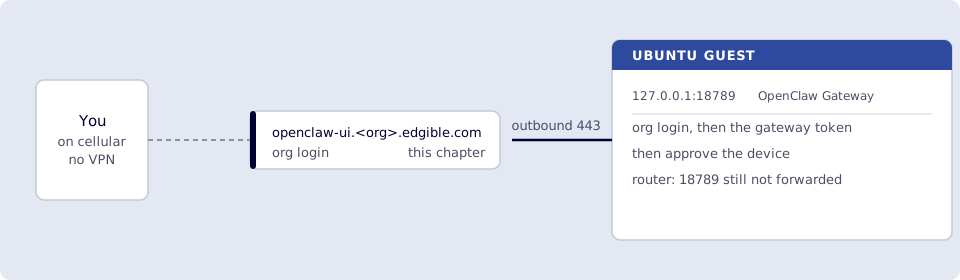
Where you run this: edgible and openclaw on the Ubuntu guest; the certificate check in the host browser; the smoke test on a phone on cellular.
2.1 The job
You publish the Control UI through Edgible. The Gateway stays on loopback; Edgible on this VM proxies to 127.0.0.1:18789. Never None on that port. Prefer the systemd Gateway (openclaw gateway start) over a foreground terminal.
Three checks, in order: Edgible org auth (only your organisation hits the hostname), the OpenClaw gateway token (first time on this browser; local openclaw dashboard does not inject it on the Edgible origin), and device pairing (openclaw devices approve <requestId> on the VM; local dashboard pairing does not cover the Edgible tab).
Done when
edgible app listshowsopenclaw-uiwith anopenclaw-ui.<org>.edgible.comURL.- Console Certificates for
openclaw-uiis issued / ready. - Protection is
org, notNone. - Phone on cellular: Edgible
orglogin, then the OpenClaw gateway token andopenclaw devices approve, then a chat reply. - Hello World URL still works (publishing unchanged).
- Port
18789is still not forwarded on the router.
Need first: Start here: Edgible on an Ubuntu VM (Hello World) and 1. OpenClaw on the VM (loopback Gateway) (Gateway + local hello). Leave hello-world running.
Not this chapter: binding 0.0.0.0, a mesh VPN, or public (None) auth on 18789.
2.2 Create the Edgible app
Edgible’s interactive picker looks at Docker (and a short list of process names). OpenClaw on loopback 18789 often does not appear. That is expected. The app is “this port on minipc,” not “this Docker name.”
Preferred, set the port yourself:
edgible device list
Note the id for minipc, then:
edgible app create existing \
  --name openclaw-ui \
  --port 18789 \
  --auth-modes org \
  --device-id <minipc-id>
Leave extra hostnames blank if asked. Allow other organizations? No. Never None.
If you already started the wizard and the list is only hello-world:
- You still have to pick a workload. Pick
hello-worldif that is all there is (it only tags the description). - When asked for the port, choose Enter a custom port →
18789. Do not leave it on8081.
Confirm ss -ltnp | grep 18789 still shows 127.0.0.1:18789 before you continue.
The CLI prints an openclaw-ui.<org>.edgible.com URL. Do not open it yet. Wait for the certificate.
2.3 Wait for the certificate
Same as Hello World. Host browser: https://app.prod.edgible.com/ → openclaw-ui → Certificates until issued.
edgible app list
edgible app status
Copy the https://openclaw-ui.<org>.edgible.com URL (no trailing path). Always copy the exact host from edgible app list.
2.4 Tell OpenClaw that origin is allowed
The landing page loading through Edgible is not enough. The Control UI’s JavaScript sends Origin: https://openclaw-ui.<org>.edgible.com. Loopback allows http://127.0.0.1:18789; Edgible is a different origin, so OpenClaw returns browser origin not allowed. That is not fixed by openclaw gateway / openclaw dashboard (those are local-only).
On the VM, get the exact hostname (no path):
edgible app list
Allow both the local UI and the Edgible origin (replace the host):
openclaw config set gateway.controlUi.allowedOrigins \
  '["http://127.0.0.1:18789","https://openclaw-ui.<org>.edgible.com"]' --strict-json
openclaw gateway restart
The Edgible value must be exactly https:// + hostname from edgible app list: pattern https://<app>.<org>.edgible.com, no path, no trailing slash, no www unless the URL has it.
openclaw config get gateway.controlUi.allowedOrigins
Hard-refresh the Edgible URL. You should get past origin-not-allowed.
Then the Control UI will likely say gateway token missing (open the dashboard URL and paste the token in Control UI settings). That is expected. openclaw dashboard injects the token only for the local browser (http://127.0.0.1:18789). The Edgible page is a different origin; you paste the token yourself.
On the VM, do not use openclaw config get gateway.auth.token. On 2026.7 that always prints __OPENCLAW_REDACTED__, which is redaction, not a missing token.
openclaw dashboard --no-open also does not print the token on this build. If clipboard is unavailable it says “Token auto-auth not delivered” and leaves http://127.0.0.1:18789/ bare. That is expected.
Read the value from disk (stay on the VM; do not paste the token or the whole file into chat):
python3 -c 'import json, pathlib; p=pathlib.Path.home()/".openclaw"/"openclaw.json"; print(json.load(p.open())["gateway"]["auth"]["token"])'
- A long string: that is the token.
- A JSON object (
source,id, …): SecretRef, so useprintenv OPENCLAW_GATEWAY_TOKEN(or the env name in that object). - Empty / KeyError:
printenv OPENCLAW_GATEWAY_TOKEN. If still empty,openclaw doctor --generate-gateway-tokenthen restart the Gateway and re-run the python line.
openclaw gateway auth-token --show is on newer docs than 2026.7.1-2; skip it if the subcommand does not exist.
Then either:
- Control UI → Settings → gateway token → paste → save, or
- Open
https://openclaw-ui.<org>.edgible.com/#token=THEVALUE(same host asedgible app list; fragment, not a query string).
Do not set gateway.auth.mode to none or trusted-proxy.
After the token is accepted, the Edgible tab will likely say device pairing required. That is expected. Local openclaw dashboard auto-pairs that one loopback browser; the Edgible origin is a new device.
Keep that browser tab open. On the VM:
openclaw devices list
openclaw devices approve <requestId>
Use the requestId from your page (not an example from this guide). Then reconnect / retry in the same tab. If the browser retried and you get a new id, devices list again and approve the current one. Do not approve a stale id.
Each new browser (phone, another profile) needs its own one-time approve. Do not turn off pairing.
If you already pasted the token and still get token missing, Edgible’s local proxy may be stripping it. Then:
openclaw config set gateway.trustedProxies '["127.0.0.1"]' --strict-json
openclaw gateway restart
Hard-refresh again and paste the token if Settings was cleared.
None (public) was only to prove the published path. Switch this app back to org when chat works; a public Control UI is an admin shell on the internet. If org auth still fails after that, it is an Edgible bug; do not leave None as the real setup.
2.5 Later visits (same browser)
You do not repeat origins, trustedProxies, token-from-disk, or devices approve every time.
| Each visit | First time only (this browser / this phone) | Only if something changed |
|---|---|---|
Open the same https://openclaw-ui.<org>.edgible.com URL |
Paste gateway token (or #token=) |
New hostname → update allowedOrigins |
Edgible org login if the session expired |
openclaw devices approve for this browser |
Cleared site data, private window, new browser/profile, or phone → token + pairing again |
Gateway already running on the mini-PC (openclaw gateway status) |
none | Token rotated / device revoked → paste + approve again |
Keep a normal (non-private) browser profile. Private windows throw away the device identity on close, so pairing looks “every time.”
2.6 Phone on cellular
Smoke test. A phone that is nowhere near the guest’s network.
- Turn Wi‑Fi off on the phone.
- Open the
httpsURL. You should get the Edgibleorglogin first. Sign in as the same account as Start here 1.3. A stranger with the URL should not see OpenClaw. - When the Control UI appears, paste the OpenClaw gateway token if asked (same reveal as 2.4: python on
~/.openclaw/openclaw.json, notconfig getand notdashboard --no-open). You can also openhttps://openclaw-ui.<org>.edgible.com/#token=…. The phone is a new device: keep the tab open,openclaw devices liston the VM, approve that requestId, then reconnect.openclaw dashboardis a local handoff; it does not replace this on the phone. - Send
hello. You want a reply, same as in the VM browser.
If hello-world still loads on the phone and openclaw-ui does not, publishing is fine. The failure is OpenClaw (certs, org login, origins, WebSocket, token).
If chat disconnects immediately, Edgible may not be proxying WebSockets yet. Stop and note that; do not “fix” it with a mesh VPN or an ingress tunnel.
Verify
-
edgible app listshowsopenclaw-uiwith anopenclaw-ui.<org>.edgible.comURL. - Console Certificates for
openclaw-uiis issued / ready. - Protection is
org, notNone. - Phone on cellular: Edgible
orglogin, then the OpenClaw gateway token andopenclaw devices approve, then a chat reply. - Hello World URL still works (publishing unchanged).
- Port
18789is still not forwarded on the router.
Next
3. OpenClaw changes the public Edgible site. Skip ahead: 4. OpenClaw skill for the Edgible CLI. Series: README.