1. The website card
A website others can reproduce: the site, the analytics and the monitor, written as one card.
1.0 Why
Website on Edgible is four apps: a public site, an open tracking script, a locked analytics dashboard, and a locked uptime monitor. Tear down the website stack deleted the hostnames and stopped the containers. This chapter takes that website from cards and publishes the four apps again.
The card for this example has two places. site, analytics, and umami are web. analytics and umami share port 3000, so they stay on one serving device. status is monitor, which can be that same device or a second one. This chapter maps both places to minipc.
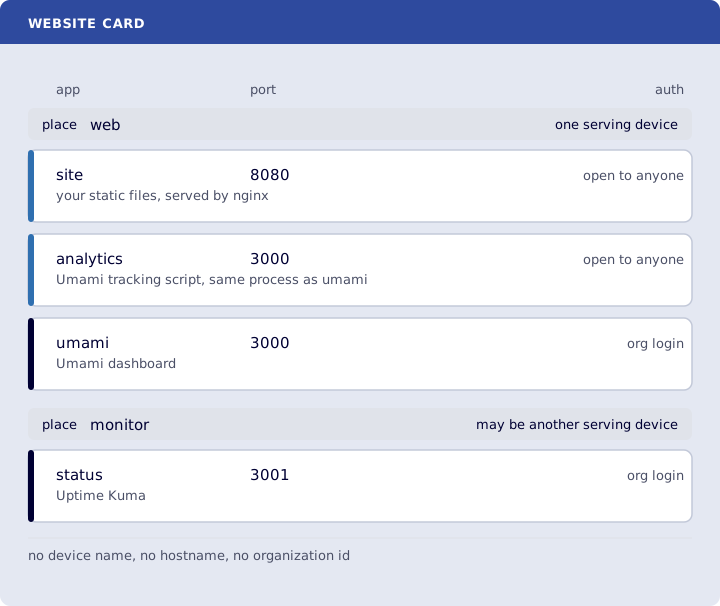
Where you run this: the Ubuntu guest. The four apps are gone. The website card fetches the Compose files.
1.1 The job
You fetch the website card, follow its README, start nginx, Umami and Uptime Kuma, generate ~/website.stack.yml from the card, and deploy it.
Done when
~/website-card.ymllistssiteon port8080withnone,analyticson port3000withnone,umamion port3000withorg, andstatuson port3001withorg.- Each app has a
whatline and afromline.umamialso namespostgres:15-alpine.analyticsnames the same Umami image asumami. That image isghcr.io/umami-software/umami:latest.statusnameslouislam/uptime-kuma:2. - The card has no
deviceName, no<org>.edgible.comhostname, and no organization id. - Each application has a
resourcessection.sitenames the Compose file in the cards repo and has nochanges.analyticsandumaminame the Umami GitHub Compose URL and the samechanges.statusnames the Uptime Kuma GitHub Compose URL and itschanges. site,analyticsandumamihaveplace: web.statushasplace: monitor.ssshows127.0.0.1:8080,127.0.0.1:3000and127.0.0.1:3001.edgible stack validate -f ~/website.stack.ymlreports 4 applications:site,analytics,umami,status.edgible app listshows those four apps again.
Need first: Tear down the website stack, including the serving agent still installed. hello-world can stay. The website card fetches the Compose files, so those directories do not have to already be on disk.
Not this chapter: a second copy of the card. The file is cards/website/card.yml. card-to-stack.py writes the stack file from that card.
1.2 Fetch the website card
The card lives in cards. This chapter does not contain a second copy. Working with an AI tool is how these guides are meant to be read alongside one, when you are writing a new card rather than using this one.
On the guest:
curl -fsSL https://raw.githubusercontent.com/Edgible/cards/main/cards/website/card.yml -o ~/website-card.yml
what is the software. from is the image. umami also names its database image, because that dashboard does not run alone. analytics is not a second program: it is the tracking script from that same Umami image.
none in the file is the auth mode None. org is the auth mode org. analytics and umami are the split surface from Publish Umami: one port, two auth modes.
place is the topology. It is not a device name. Applications with the same place run on one serving device, and that device is where the serving agent for those apps runs. site, analytics and umami are web, and analytics and umami have to stay together because they are one process on port 3000. status is monitor, so it can live on a second serving device. A monitor on the same machine as the site cannot report that machine going down, which is What this cannot tell you. This chapter maps both places to minipc.
The Compose files and the edits are on the website card.
subtype: existing on every app means a process is already listening on that port. The card only records the port. nginx, Umami and Uptime Kuma are still stopped, from Tear down the website stack. The next step starts them, so those ports have something listening before you publish.
1.3 Start the containers
The Compose files and the edits are on the website card. Follow that page. It fetches the files and runs tailor.sh.
Start the three Compose files:
docker compose -f ~/site/docker-compose.yml up -d
docker compose -f ~/umami/docker-compose.yml up -d
docker compose -f ~/uptime-kuma/compose.yaml up -d
ss -ltnp | grep -E '8080|3000|3001'
127.0.0.1:8080, 127.0.0.1:3000 and 127.0.0.1:3001 are listening. If Tear down the website stack removed the Umami tracking snippet from your pages, put it back from Publish Umami when you want page views again. The hostnames publish either way.
1.4 Generate the stack file and deploy it
The ports from 1.3 are listening. edgible stack deploy reads a stack file, and each app in it is pre-existing, so deploy publishes those ports. card-to-stack.py writes that file from the card. It reads ~/website-card.yml, takes the organization id from edgible config get organizationId, and writes one Application document per app. --device minipc places all four on the serving device from Start here. Auth mode org in the card is written edgible-login in the stack file.
Running the script yourself is the current step. Later, edgible stack export --card will write the stack file from the card, and this download goes away.
On the guest:
curl -fsSL https://raw.githubusercontent.com/Edgible/cards/main/tools/card-to-stack.py -o ~/card-to-stack.py
python3 ~/card-to-stack.py ~/website-card.yml --device minipc > ~/website.stack.yml
python3 --version prints a version. Ubuntu includes it.
Smoke test. On the guest:
edgible stack validate -f ~/website.stack.yml
The report says 4 applications, site, analytics, umami and status, each pre-existing. That is the card, with your device name and your organization id filled in.
Deploy that file:
edgible stack deploy -f ~/website.stack.yml
edgible app list
Deploy waits until those apps are published. edgible app list shows them again: site and analytics with None, umami and status with org.
--device minipc puts both places on minipc. To put the monitor on a second serving device, pass --device web=minipc --device monitor=otherbox. otherbox has to be a serving device you already have.
Verify
-
grep -nE 'name: (site|analytics|umami|status)|port:|authModes:' ~/website-card.ymlshows the four apps, ports8080,3000,3000,3001, and auth modesnone,none,org,org. -
grep -nE 'what:|from:|database:' ~/website-card.ymlshowsnginx:alpine,ghcr.io/umami-software/umami:lateston bothanalyticsandumami,postgres:15-alpine, andlouislam/uptime-kuma:2. -
grep -nE 'deviceName|organization' ~/website-card.ymlprints nothing. -
grep -n 'edgible.com' ~/website-card.ymlprints nothing. -
grep -n 'compose:' ~/website-card.ymlshowshttps://raw.githubusercontent.com/Edgible/cards/main/cards/website/docker-compose.ymlundersite,https://raw.githubusercontent.com/umami-software/umami/master/docker-compose.ymlunder bothanalyticsandumami, andhttps://raw.githubusercontent.com/louislam/uptime-kuma/master/compose.yamlunderstatus. -
grep -n 'Bind the host port' ~/website-card.ymlshows that change underanalytics,umami, andstatus, and not undersite. -
grep -n 'place:' ~/website-card.ymlshowswebforsite,analyticsandumami, andmonitorforstatus. -
ss -ltnp | grep -E '8080|3000|3001'shows127.0.0.1on each port. -
edgible stack validate -f ~/website.stack.ymlreports 4 applications:site,analytics,umami,status. -
edgible app listshowssite,analytics,umamiandstatusagain.
Next
2. The n8n card. Series: README.