OpenClaw on Edgible: chapters
The agent everyone is currently trying, with its shell and its admin console kept off the internet.
An AI agent that chats, runs commands and edits files is the thing most people are experimenting with right now, and it is the thing least suited to a rented box: it holds your keys, it has a shell, and the fastest route to using it from a phone is opening a port on an admin console. This series takes the other route. The Gateway stays on loopback for the whole guide, the Control UI is published behind your organisation's login, and by the end the agent is rewriting a public page from a phone on cellular.
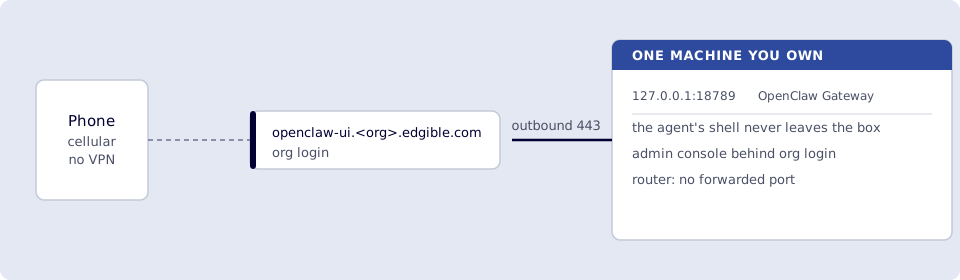
OpenClaw chats and uses tools on a box you own. Edgible is the public https://<app>.<org>.edgible.com hostname, reached over outbound 443 only. No port-forward, no mesh VPN. The Edgible story here is the Control UI: phone browser, org login, no SSH tunnel on the laptop. Telegram and WhatsApp are chat clients; they are not Edgible apps.
Publishing plus two auth modes on one process (editor org, webhooks None) is n8n on Edgible. A remote self-hosted Gateway calling a self-hosted Ollama on another home machine is LLM on Edgible. That is not this series and not chapter 8; chapter 8 is same-LAN or cloud keys.
Each chapter is one job and one smoke test. Do them in order.
How to read a chapter: a one-line hook under the title, then N.0 Why (what is missing without this chapter, and which machine you run it on), then N.1 The job (what you’ll do, how you’ll know, what you need, what this is not). Steps after that, a Verify checklist that mirrors Done when, and Next at the end.
Need first: Start here, which installs the serving agent and leaves Hello World published. Every guide starts there, and this series assumes it is done.
| # | Chapter | Smoke test |
|---|---|---|
| 1 | 1. OpenClaw on the VM (loopback Gateway) | openclaw agent … hello; local Control UI (openclaw dashboard) if the guest has a desktop |
| 2 | 2. OpenClaw Control UI through Edgible | Phone opens openclaw-ui.<org>.edgible.com (org auth), chat works |
| 3 | 3. OpenClaw changes the public Edgible site | Control UI rewrites Hello World; optional hourly On this day |
| 4 | 4. OpenClaw skill for the Edgible CLI | VM edgible whoami and Control UI /skill edgible whoami |
| 5 | 5. Telegram pocket client for OpenClaw | DM your bot; /skill edgible whoami |
| 6 | 6. WhatsApp linked device for OpenClaw | Linked device hello with [OpenClaw]; optional ACP --bind here |
| 7 | 7. Cursor Agent from OpenClaw on the Edgible site | /acp doctor then spawn; Control UI uses steer; WhatsApp can bind |
| 8 | 8. Models beyond free Gemini | openclaw agent --model … hello on DeepSeek / Ollama / another key; optional fallbacks |
| 9 | 9. Tear down OpenClaw | openclaw-ui gone; nothing on 18789; n8n / ollama / serving agent left unless you take the optional step |
Do not use ! edgible whoami as the OpenClaw check in chapter 1. That is host bash (commands.bash), off by default, and needs elevated allowlists. Chapter 4 is /skill edgible whoami. Chapter 5 can enable ! if you want a host shell from Telegram.
The skill source is openclaw-edgible, not this repo.
Workflows (webhooks and auth split, not an agent): n8n on Edgible, on the same VM from Start here. A model you control, published for both products: LLM on Edgible.