1. OpenClaw on the VM (loopback Gateway)
OpenClaw on your own VM, answering locally, not yet published.
1.0 Why
Start here published a process on your box to the internet, but that process was a throwaway page. This chapter installs something worth reaching from a phone: an agent that chats, runs shell commands, and writes files on hardware you own.
Two shortcuts do not work here. Running OpenClaw on your laptop instead of the guest means the agent stops when you shut the lid, and its shell tool points at your personal machine rather than a box you are willing to hand it. Binding the Gateway to 0.0.0.0 and forwarding 18789 is the fast route to phone access, but the Control UI is an admin console over a process with a shell, so that port should not be reachable from a scanner. The Gateway stays on loopback for this whole chapter. The published hostname waits for chapter 2, where Edgible reaches it over loopback and puts a login in front.
That leaves the model. Google’s free AI Studio key is enough to prove a hello, but OpenClaw’s Google default is often a Pro or preview id whose free-tier quota is almost nothing. That is the 429 most people blame on their install. Pinning a Flash id here is what makes every later chapter’s chat work.
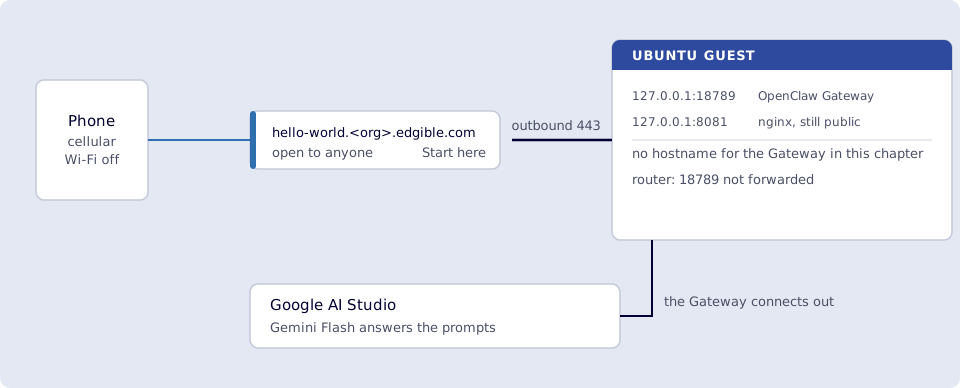
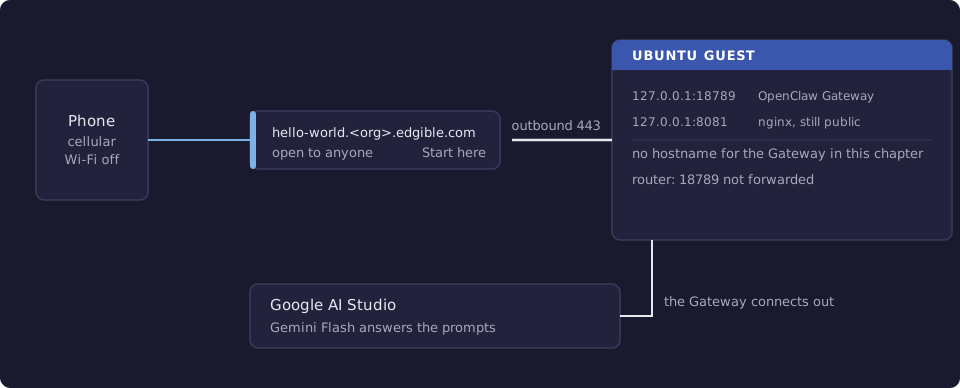
Where you run this: the AI Studio key in the host browser; the install, the model pin and the hello on the Ubuntu guest; the optional Control UI check needs a guest desktop; Hello World still checked on a phone on cellular.
1.1 The job
You install OpenClaw on the same Ubuntu guest as Hello World. The Gateway stays on loopback (127.0.0.1:18789). Pin Gemini Flash on the free AI Studio key (not Pro/preview; that is the 429). DeepSeek, Ollama, OpenAI, and fallbacks are 8. Models beyond free Gemini.
Done when
openclaw --versionprints a version on the VM.openclaw gateway statusshows the Gateway running on18789, bind loopback.openclaw models statusshows a Flash (not Pro/preview) default.openclaw agent --agent main --thinking off --message "Say hello in one sentence."returns a reply (identity ritual counts).- Hello World on the phone still loads (publishing unchanged).
curltohttp://127.0.0.1:18789/on the VM returns200.- Optional, guest desktop only: with the Gateway running,
openclaw dashboardopens the local Control UI and chat works.
Need first: Start here: Edgible on an Ubuntu VM (Hello World still up).
Not this chapter: publishing Control UI (2), the Edgible skill (4), other model providers (8), or ! edgible whoami (host bash, off by default; 5.10 if you want it later).
1.2 Google Gemini (free)
Outcome: An AI Studio key the VM can call. This chapter assumes Gemini. Other providers wait until chapter 8.
OpenClaw onboarding will not finish until a real completion succeeds. ChatGPT Free (chatgpt.com) is not that: it is a website, not an API key.
Leave hello-world running. Get the key now; you will paste it on the VM in the next step.
Do this on the host browser, not inside the VM. You need a Google account (Gmail is fine).
- Open https://aistudio.google.com/apikey and sign in.
- If Google shows terms for AI Studio / the Gemini API, accept them.
- Click Create API key.
- Choose Create API key in a new project unless you already know which Google Cloud project to use.
- Copy the key (it usually starts with
AIza). Store it like a password. You will type it on the VM in the next step. Do not commit it, paste it into a chat, or put it in Hello World.
The free tier is enough to prove hello. It is rate-limited. Outside the EU, Google may use free-tier traffic to improve products; that is Google’s policy, not Edgible’s.
Optional check from the VM (proves the key and that the guest can reach Google). Paste is hidden:
read -s GEMINI_API_KEY
export GEMINI_API_KEY
curl -sS "https://generativelanguage.googleapis.com/v1beta/models?key=${GEMINI_API_KEY}" \
  | python3 -c "import sys,json; print(json.load(sys.stdin)['models'][0]['name'])"
You want a model name such as models/gemini-2.5-flash, not API_KEY_INVALID or a hang. (If you piped the full JSON to head instead, curl: (23) Failure writing output to destination after that JSON is still success; head closed the pipe early.) If the request itself fails on the VM, fix outbound HTTPS before installing OpenClaw.
DeepSeek, Groq, OpenAI, Ollama, and fallbacks: 8. Models beyond free Gemini, after this Gateway hello works.
1.2.1 Verify
- You have an AI Studio key (
AIza…), not ChatGPT Free. - The VM
curlto Google’smodelslist printed a model name. - The key was not pasted into Slack, git, or the Hello World page.
1.3 Install OpenClaw locally
Outcome: OpenClaw Gateway running on the VM; you can send hello from the guest terminal and get a reply. It is not on the internet yet.
Still inside the VM. Leave hello-world and the Edgible serving agent running. Do not install OpenClaw on the Mac/PC host for this guide.
This VM is Ubuntu Server, so there is no desktop browser. Local proof is the CLI, not openclaw dashboard.
1.3.1 Install the OpenClaw CLI
OpenClaw needs Node.js 22.22.3+ (the installer can provision it). That is newer than Edgible’s Node 20 floor; let this installer handle it.
curl -fsSL https://openclaw.ai/install.sh | bash -s -- --no-onboard
--no-onboard skips the long interactive wizard (Telegram and friends). We will onboard with Gemini in the next substep.
Reload PATH if openclaw is not found (new shell, or source ~/.bashrc):
openclaw --version
Official reference: Install.
1.3.2 Onboard with your model (Gemini default)
If GEMINI_API_KEY is empty in this shell, paste it again (hidden):
read -s GEMINI_API_KEY
export GEMINI_API_KEY
Then:
openclaw onboard --non-interactive --accept-risk \
  --mode local \
  --auth-choice gemini-api-key \
  --gemini-api-key "$GEMINI_API_KEY" \
  --gateway-bind loopback \
  --install-daemon \
  --skip-skills
--accept-risk is OpenClaw’s required flag for unattended setup (OpenClaw can use tools and a shell). It is not an Edgible setting.
--gateway-bind loopback keeps the Control UI on 127.0.0.1:18789 only. Do not bind 0.0.0.0 and do not port-forward 18789 on the router.
--skip-skills keeps this first hello about the Gateway + Gemini, not extra downloads. The Edgible CLI skill is chapter 4. Telegram is chapter 5. Other model keys: chapter 8.
1.3.3 Pin a Flash model (required on Gemini free tier)
OpenClaw’s Google default is often a Pro or preview model. Free-tier quota on those is tiny. That is the 429 you hit if you skip this.
Google’s API name from 1.2 (models/gemini-2.5-flash) is not always OpenClaw’s id. Do not guess. List what this install knows, then set a Flash or Flash-Lite row from that list (avoid Pro / preview):
openclaw models list --provider google
Copy an id from the output. Pick in this order (use a row that is actually listed):
flashin the name, nopro, nopreview:google/gemini-2.5-flash,google/gemini-3-flash,google/gemini-flash-latest.- If several Flash rows: prefer the latest or highest 2.x or 3.x Flash, not
-lite, not-thinking. - Flash-Lite only if you are hitting 429s on Flash and need more RPM (weaker at tools).
- Never Pro, Ultra, or
*-previewon the AI Studio free key. That is the 429.
Then:
openclaw models set google/<the-flash-id-from-list>
openclaw gateway restart
If set or the next chat says model was not found, you guessed. Run list again and set an id that is actually printed.
OpenClaw’s memory search still defaults to OpenAI embeddings even when chat is Gemini. You will see a warning that no OPENAI_API_KEY was found. That is not required for this trial. Do not add an OpenAI key just to silence it. Disable it:
openclaw config set agents.defaults.memorySearch.enabled false
openclaw gateway restart
To keep semantic memory on the same Gemini key instead: openclaw config set agents.defaults.memorySearch.provider gemini (uses extra quota). Verify with openclaw memory status --deep.
1.3.4 Confirm the Gateway
openclaw gateway status
openclaw doctor
Expect the Gateway running on port 18789, loopback. Confirm the bind with:
openclaw config get gateway.bind
ss -ltnp | grep 18789
You want bind = loopback (or equivalent), and ss showing 127.0.0.1:18789 (and maybe [::1]:18789). 0.0.0.0:18789 or *:18789 means it is listening on every interface, which this guide does not want. NAT still hides that from the internet, but do not leave it that way.
Linux installs a systemd user unit. If you use SSH and then log out, keep it alive:
sudo loginctl enable-linger "$USER"
If status is down:
openclaw gateway install
openclaw gateway restart
openclaw logs --follow
(Ctrl+C stops following logs.)
1.3.5 Chat from the VM terminal
Smoke test. The Gateway must be up. Do not pass --local (that fights the running Gateway).
openclaw agent --agent main --thinking off --message "Say hello in one sentence."
You should get a short reply in the terminal. That is local OpenClaw working. Your phone still cannot reach it.
The first turn is often OpenClaw’s identity ritual (Who am I? Who are you?) instead of a literal hello. That still counts. Answer in one line, for example:
openclaw agent --agent main --thinking off --message "You are OpenClaw on my Ubuntu VM. I am Bruce. Say hello in one sentence."
If the model was not found, go back to 1.3.3. You set an id OpenClaw does not have.
If you see 429 / quota exceeded, OpenClaw is fine. Google’s free tier refused the request. You are still on Pro/preview, or you already used the daily cap. Pin Flash (1.3.3), wait a minute (RPM) or until tomorrow (daily). If logs say google is in cooldown, wait that out. To keep going on a paid or local model: 8. Models beyond free Gemini. Usage: Google AI Studio.
Optional TUI on the VM console:
openclaw tui
1.3.6 Control UI in a browser (before Edgible)
If this Ubuntu VM has a desktop, do not hunt for the token and paste a URL by hand. From a terminal on the VM desktop (so it can open Firefox/Chromium):
- Make sure the Gateway is running. If
openclaw gateway statusis not up:
openclaw gateway
Leave that terminal open (foreground). Or use openclaw gateway start if the systemd unit is installed.
- In a second terminal on the same desktop:
openclaw dashboard
That launches the VM browser onto the Control UI (a short-lived handoff; you will not normally have to paste gateway.auth.token). Send hello.
curl → 200 only means HTML is served. openclaw dashboard is the check that the browser and WebSocket path works.
If there is no GUI, there is no in-guest browser. Skip to Edgible, or forward host 127.0.0.1:18789 → guest 18789 in UTM/VirtualBox and use the Mac browser. Do not port-forward 18789 on the router.
1.3.7 Do not do these yet
- Telegram / Discord. They already connect out; they are not the Edgible job. Skill: chapter 4. Telegram: chapter 5. WhatsApp: chapter 6.
- DeepSeek / Ollama / OpenAI as the chat model: chapter 8, after this hello works.
- Mesh VPNs, ingress tunnels, or other tools that publish a local port.
gateway.authset to none.
1.3.8 Verify
-
openclaw --versionprints a version on the VM. -
openclaw gateway statusshows the Gateway running on18789, bind loopback. -
openclaw models statusshows a Flash (not Pro/preview) default. -
openclaw agent --agent main --thinking off --message "Say hello in one sentence."returns a reply (identity ritual counts). - Hello World on the phone still loads (publishing unchanged).
-
curltohttp://127.0.0.1:18789/on the VM returns200. - Optional, guest desktop only: with the Gateway running,
openclaw dashboardopens the local Control UI and chat works.
Next
2. OpenClaw Control UI through Edgible. Other models (not this chapter): 8. Models beyond free Gemini. Skill: 4. OpenClaw skill for the Edgible CLI. Series: README.