6. WhatsApp linked device for OpenClaw
The chat client most people already have, and the one that can bind a Cursor session.
6.0 Why
Telegram asks anyone you want to include to install something first. WhatsApp is already on the phone. There is also a mechanical reason to have it: Control UI is webchat, and webchat cannot bind a conversation to a Cursor session, so every follow-up in chapter 7 needs a steer command carrying a uuid. A bound WhatsApp thread becomes the Cursor session until you close it, and you type normal sentences.
The cost is that this is a linked device on your own account rather than a bot: no bot badge, replies that look like you talking to yourself, and a QR you have to see in order to scan it. That is why the reply prefix exists, and why a dedicated second number is cleaner if you have one. As with Telegram, none of this is an Edgible app. The Gateway connects out; do not publish a hostname or forward a port for a chat channel.
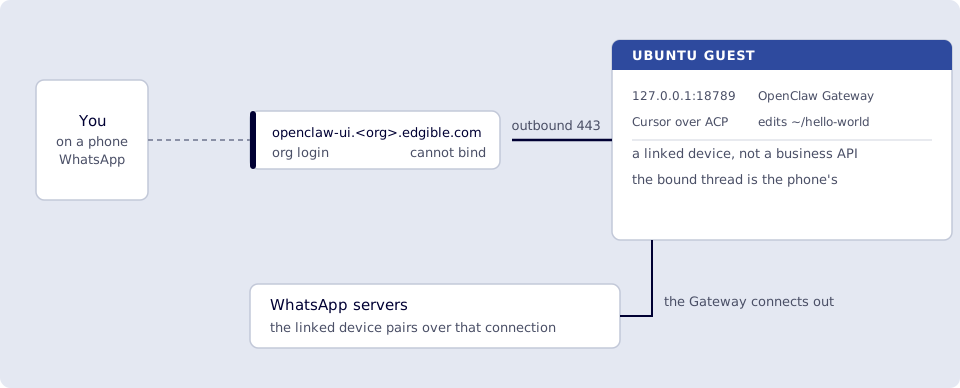
Where you run this: the plugin, config and the QR on the Ubuntu guest (the QR is text, so the console or SSH is fine); the chat in WhatsApp on a phone; the page refresh in a phone browser on cellular.
6.1 The job
You link the Gateway as another WhatsApp device (same idea as WhatsApp Web). Incoming DMs hit OpenClaw on the VM. Gemini stays the dispatcher until you bind Cursor; then this thread is the Cursor session until /acp close. Control UI cannot --bind here. Skip if you have no WhatsApp. 5. Telegram pocket client for OpenClaw is everyday chat without linking a device.
A dedicated second number is cleaner. Self-chat on your personal number works (allowFrom includes you, selfChatMode on). WhatsApp has no bot badge, so set messages.responsePrefix to make replies start with [OpenClaw].
Done when
openclaw channels status --probeshows WhatsApp linked.- WhatsApp
hellogets a reply that starts with[OpenClaw](pairing approved if asked). - Optional:
/acp spawn cursor --bind here …succeeds in WhatsApp (no webchat bind error). - Optional: public On this day page shows “Who this is / Why we remember them / One odd fact” after a hard-refresh.
- Optional: you did not use
/acp steerfor this change. permissionModeisapprove-readsagain. openclaw-ui is stillorg. Port18789is still not forwarded.
Need first: 1. OpenClaw on the VM (loopback Gateway). For ACP bind, 7. Cursor Agent from OpenClaw on the Edgible site through doctor. For the retitle demo, the designed page from 3 or 7.
Not this chapter: publishing WhatsApp through Edgible, port-forwarding, or None on openclaw-ui.
6.2 Plugin + QR login
Run this in a terminal you can look at while holding your phone, with the Gateway running. The QR is drawn as text, so the VM console or an SSH session from your laptop both work, and it expires in about a minute. Widen the window first if the QR wraps, because a wrapped one will not scan:
openclaw plugins install clawhub:@openclaw/whatsapp
openclaw gateway restart
openclaw channels login --channel whatsapp
If install already happened, channels login is enough. Phone: WhatsApp → Settings → Linked devices → Link a device → scan the terminal QR. You want a linked session, not “can’t link new devices” (remove a stale Web session, or wait if WhatsApp is throttling).
openclaw channels status --probe
WhatsApp should show connected / linked.
Do not paste session creds into chat or Hello World.
6.3 Who may DM
Default is pairing (unknown senders wait). Put your E.164 in allowFrom (example shape only; use your number):
openclaw config set channels.whatsapp.dmPolicy pairing
openclaw config set channels.whatsapp.allowFrom '["+61XXXXXXXXX"]' --strict-json
openclaw config set channels.whatsapp.selfChatMode true
openclaw config set channels.whatsapp.groupPolicy allowlist
openclaw config set messages.responsePrefix "[OpenClaw] "
openclaw gateway restart
6.4 First WhatsApp hello
Smoke test. From the phone, message yourself (or a second phone messaging the linked account). If OpenClaw asks to pair:
openclaw pairing list whatsapp
openclaw pairing approve whatsapp <CODE>
That is the same idea as devices approve for the Control UI; it is not the WhatsApp QR. Send hello. You want a reply in WhatsApp that starts with [OpenClaw] (Gemini, or whatever you set in 8). Edgible is unused for this hop.
A bare “Hey Bruce! How can I help you today?” is still the Gateway; it just has no product label. WhatsApp shows it as your linked session. Self-chat is supposed to default to [openclaw] / [{identity.name}] when responsePrefix is unset; that does not always fire. The explicit prefix from 6.3 is the check.
6.5 Bind Cursor: retitle sections (no steer)
If you set permissionMode back to approve-reads in chapter 7, headless Cursor cannot write HTML. For this pass:
openclaw config set plugins.entries.acpx.config.permissionMode approve-all
openclaw gateway restart
In the same WhatsApp chat (not Control UI):
/acp spawn cursor --bind here --thread off --cwd /home/YOURUSER/hello-world
You want a spawn without Conversation bindings are unavailable for webchat. Then a normal message, not /acp steer:
Rename the three section headings to: Who this is. Why we remember them. One odd fact.
Keep the body copy, CSS, and the next-rotation footer (IANA timezone).
Update the Python updater so the next hourly run uses those headings too.
Do not docker exec. Do not touch ~/.openclaw or Edgible.
Wait for Cursor to finish in WhatsApp. /acp close when done. Then set permissionMode back to approve-reads (chapter 7).
Leave WhatsApp, hard-refresh https://hello-world.<org>.edgible.com (cellular). You want the new titles, same person, same footer.
Verify
-
openclaw channels status --probeshows WhatsApp linked. - WhatsApp
hellogets a reply that starts with[OpenClaw](pairing approved if asked). - Optional:
/acp spawn cursor --bind here …succeeds in WhatsApp (no webchat bind error). - Optional: public On this day page shows “Who this is / Why we remember them / One odd fact” after a hard-refresh.
- Optional: you did not use
/acp steerfor this change. -
permissionModeisapprove-readsagain. openclaw-ui is stillorg. Port18789is still not forwarded.
Next
7. Cursor Agent from OpenClaw on the Edgible site if you have not done ACP yet. Other models: 8. Models beyond free Gemini. Series: README.