2. n8n editor through Edgible
Your workflow canvas, on your phone, behind an org login.
2.0 Why
Right now n8n only exists for whoever is sitting at the VM. Chapter 1 left it on loopback, so the canvas is stuck on that one machine. No phone, no laptop in another room, nothing a colleague could reach.
Forwarding 5678 on the router puts a credential store holding every API key you own on the open internet. A mesh VPN means every device that ever needs the canvas has to enrol first. Edgible is the third option: the guest connects out on 443, and zero-DNS publish gives you a working https:// hostname with certificate and auth mode set, with no DNS step (see Glossary).
Edgible auth is per app, that is, per hostname, not per path within one URL. This hostname serves the canvas, the credentials and every workflow you will ever write, so it stays org and only your organisation can get past it. Stripe and GitHub cannot complete a browser login, so they get a second, separate hostname in chapter 3 instead. Do not set this app to None to make webhooks work.
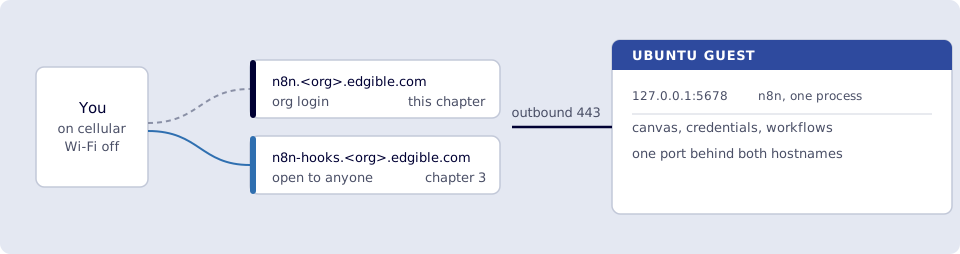
Where you run this: edgible on the Ubuntu guest; the certificate check in the host browser; the smoke test on a phone on cellular.
2.1 The job
You publish n8n’s editor through Edgible. n8n stays on loopback 5678. Protection is org, never None on this hostname. GitHub cannot log into your org; inbound webhooks are a different app in chapter 3.
Done when
edgible app listshows n8n on ann8n.<org>.edgible.comURL, protectionorg.- The certificate for n8n is issued.
- Phone on cellular opens that URL: Edgible
orglogin, then n8n owner signup (first time) or sign-in, then the canvas. - Hello World still loads, and port
5678is still not forwarded.
Need first: 1. n8n on the VM and Edgible on an Ubuntu VM (minipc, Hello World). Leave hello-world and the n8n container running.
Not this chapter: WEBHOOK_URL, a public hooks hostname, cron, or OpenClaw.
2.2 Create the Edgible app
n8n is Docker, so the picker may list it. Port must be 5678, auth org.
edgible device list
Note the id for minipc, then:
edgible app create existing \
  --name n8n \
  --port 5678 \
  --auth-modes org \
  --device-id <minipc-id>
Leave extra hostnames blank. Allow other organizations? No. Never None on this app.
Wizard instead: edgible app create existing → name n8n → protection Org → device minipc → port 5678 (custom if the list shows 8081).
The CLI prints an n8n.<org>.edgible.com URL. Do not open it yet. Wait for the certificate.
2.3 Wait for the certificate
Host browser: https://app.prod.edgible.com/ → n8n → Certificates until issued.
edgible app list
edgible app status
Copy the https://n8n.<org>.edgible.com URL (no path). Always copy the exact host from edgible app list.
2.4 Open it on the phone
Smoke test. Cellular, not the VM’s Wi‑Fi.
- Open that HTTPS URL.
- Sign in to Edgible (
org). - n8n’s own owner signup or login (email + password n8n stores on the VM volume). That is not the Edgible password.
- You want the empty canvas (or the home/workflows list).
If the tab loads a shell but the canvas stays blank, Edgible may not be proxying WebSockets yet. Stop and note that; do not “fix” it with a mesh VPN or an ingress tunnel.
Verify
-
edgible app listshows n8n on ann8n.<org>.edgible.comURL, protectionorg, notNone. - Console Certificates for n8n is issued.
- Phone on cellular: Edgible login, then n8n signup/sign-in, then the canvas.
- Hello World still loads, and port
5678is still not forwarded.
Next
3. Public webhook hostname. Series: README.