2. Edgible publishes Ollama
Publish Ollama over HTTPS with a bearer secret, not a forwarded port.
2.0 Why
After chapter 1 the model answers only to whoever is sitting at the Mac. Nothing else can reach it, let alone n8n or OpenClaw on another computer. Forwarding 11434 on the router hands strangers an unauthenticated inference endpoint on your own hardware. A mesh VPN means every future caller has to enrol first.
The serving agent runs on this Mac, beside Ollama. Ollama.app listens on localhost until you set OLLAMA_HOST to 0.0.0.0:11434. An existing app on that port publishes it. The agent connects out on 443, so nothing inbound is opened on the router.
The auth mode is set per app, and each app is one hostname, so this hostname decides who may use your GPU. It is api-key. With None, anyone on the internet could run inference on your GPU, and org is a human browser login that curl, an n8n node and an OpenClaw Gateway cannot complete. Callers send Authorization: Bearer, and the weights stay on the Mac.
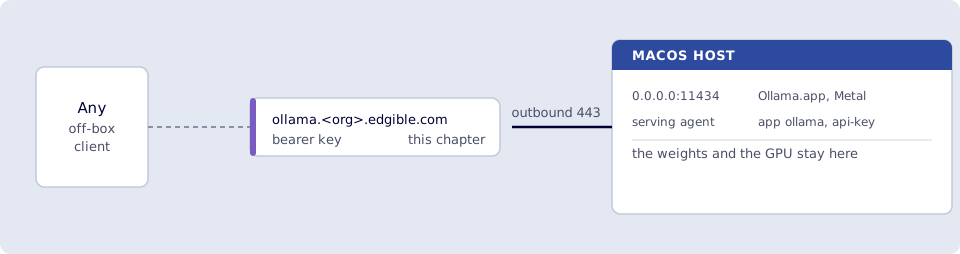
Where you run this: launchctl, lsof, edgible and the local curl on the macOS host. The HTTPS curl from a phone on cellular or any laptop off the LAN. Optional Chatbox on the Mac.
2.1 The job
You bind Ollama to 0.0.0.0:11434 on the Mac, publish that port as an existing app with api-key, and hit the HTTPS URL from cellular with a Bearer token.
Done when
- Mac
OLLAMA_HOSTis0.0.0.0:11434.lsofshows*:11434or0.0.0.0:11434.curltohttp://127.0.0.1:11434/api/tagsis JSON, includingqwen2.5:7b. edgible app listshowsollamawithapi-key(notNone, notorgalone), certificate issued.- You saved the secret from
create(not the key id fromlist). - From a phone on cellular (or a laptop off the LAN),
curlwithAuthorization: Bearertohttps://ollama.<org>.edgible.com/api/tagsreturns that JSON, not an Edgible login HTML page. - Optional: Chatbox on the Mac chats via
https://ollama.<org>…/v1and the same secret (2.5). - Port
11434is not forwarded on the router. - You did not set this app to
None.
Need first: 1. Ollama on bare metal, with Mac Ollama running. The Edgible CLI on this Mac, logged in (edgible whoami). A serving agent on this Mac. 2.3 installs one under your account if edgible device health does not already print Health check OK.
Not this chapter: n8n nodes, OpenClaw models set, None on this app, or a relay on another machine.
2.2 macOS: listen on 0.0.0.0:11434
Terminal.app on the Mac. launchctl and open -a are macOS.
Ollama.app defaults to localhost. Set the bind, then quit and reopen the app so it picks the variable up:
launchctl setenv OLLAMA_HOST "0.0.0.0:11434"
killall Ollama
open -a Ollama
Wait until the llama icon is in the menu bar (a few seconds). Then:
ollama ps
Error: ollama server not responding - could not find ollama app means the app is not running. open -a Ollama again, or Finder → Applications → Ollama. If ollama ps is empty (app is up, no model loaded), run the one-word hello from chapter 1 again.
After a Mac logout, run launchctl setenv and restart Ollama again. Do not port-forward 11434 on the router. Callers in later chapters use the HTTPS hostname.
Smoke test (macOS host).
lsof -nP -iTCP:11434 -sTCP:LISTEN
curl -sS http://127.0.0.1:11434/api/tags
lsof should show *:11434 or 0.0.0.0:11434. 127.0.0.1:11434 means OLLAMA_HOST did not stick: the menu-bar app has to actually quit and reopen, then run 2.2 again. The curl should be JSON listing qwen2.5:7b.
2.3 Create the existing app (macOS)
On the Mac. If this machine is already a serving device, edgible device list shows it and edgible device health --name <name> prints Health check OK. Use that device id below.
If it does not, install the agent here. It runs under your account, and on this Mac it runs while you are logged in. The name is letters and digits, unique in the org:
edgible agent install \
  --device-type serving \
  --device-name macbook \
  --non-interactive
edgible agent start
edgible device health --name macbook
Then create the app. --port 11434 is the Ollama listen from 2.2. --device-id is the id from edgible device list for this Mac.
edgible device list
edgible app create existing \
  --name ollama \
  --port 11434 \
  --auth-modes api-key \
  --device-id <macbook-id>
Leave extra hostnames blank. Allow other organizations? No. Never None. Do not use org alone. curl and n8n cannot complete a browser login.
Wait for the certificate: console → ollama → Certificates, or edgible app list / edgible app status. Copy https://ollama.<org>.edgible.com exactly (no path, no :11434). That hostname is zero-DNS publish: issued without a registrar or zone edit (defined in Glossary).
2.4 API key (macOS) and cellular smoke (any off-LAN device)
Create and list keys with edgible on the Mac. The HTTPS curl runs from a phone on cellular, or any laptop that is not on this Mac’s LAN.
Create a key (name it e.g. laptop-curl).
edgible app list
edgible app api-keys create --app-id <ollama-app-id> --name laptop-curl
(edgible application api-keys create is the same command.)
The secret (the long token in the create output) is printed once. Copy it immediately into a local env var on the machine you will curl from, e.g. export EDGIBLE_APP_KEY='…'. Do not paste it into chat or a public gist. If you dismiss the output, Edgible will not show that value again. Create a new key.
Then list keys so you can tell id from secret:
edgible app api-keys list --app-id <ollama-app-id>
(edgible app api-key list if your CLI uses the singular alias.)
List rows are metadata: name, key id, created / expiry. That id is not the API key. Authorization: Bearer must be the secret from create, not the id from list. Using the id as Bearer returns 401. Lost secret → api-keys delete that id, then create again.
Smoke test (phone on cellular). From a phone on cellular or a laptop not on the Mac’s LAN:
curl -sS "https://ollama.<org>.edgible.com/api/tags" \
  -H "Authorization: Bearer $EDGIBLE_APP_KEY"
You want the tags JSON. An HTML login page means the app is org. HTTP 401 means the Bearer is missing or wrong. localhost or :11434 in the URL means you copied the wrong origin.
For a chat window instead of curl, skip the optional generate below and go to 2.5 Chatbox.
Optional. Prove a completion (slow on a 7B; still GPU on the Mac):
curl -sS "https://ollama.<org>.edgible.com/api/generate" \
  -H "Authorization: Bearer $EDGIBLE_APP_KEY" \
  -H "Content-Type: application/json" \
  -d '{"model":"qwen2.5:7b","prompt":"Reply with exactly: ok","stream":false}'
n8n and OpenClaw run on other machines. They call this HTTPS origin with Bearer. Do not give them http://<mac-lan-ip>:11434.
2.5 Optional: a real chat UI (not curl)
curl proves the published hostname works. For a demo, use a desktop client that speaks OpenAI-compatible /v1 with a Bearer key. GPU stays on the Mac; the app only calls https://ollama.<org>.edgible.com.
Local only: the Ollama menu-bar app on the Mac can chat to localhost. That does not prove the public HTTPS + api-key path.
Published endpoint: Chatbox (Mac/Windows/Linux).
- Settings (bottom left of the sidebar) → Model Provider.
- Add → type OpenAI API compatible (not Chatbox’s own cloud, not “OpenAI” with
api.openai.com). - API Key = the secret from 2.4. API Host =
https://ollama.<org>.edgible.com(Chatbox usually appends/v1/chat/completionsitself; if chat fails, try the same URL with/v1). - Add a model. The id must be exactly what
ollama lsshows, e.g.qwen2.5:7b. Save. Use Check if the UI has it. You want connection OK, not 401. - Leave Settings. Click the back chevron, or click Chatbox in the sidebar, until you see the big empty chat pane and an input at the bottom. There is no button labelled “New conversation”.
- If you still only see Settings: look left for the sidebar. It may be hidden, so use ☰ (top left) or drag the window wider. In the sidebar the button is New Chat (sometimes a
+). You can skip that: if a blank thread is already open, just use the input box at the bottom. - In that thread, open the model picker (usually above the input, or at the top of the pane). Pick your custom provider +
qwen2.5:7b. If it still says GPT-4 / Chatbox AI, you are on their cloud, not Ollama. - Type
Say hello in one sentenceand send. First 7B reply can take several seconds (GPU on the Mac).
A 401 is a bad secret. HTML login means an org hostname. Empty models or a failed Check means Ollama is not listening on 11434. Streaming then a hang means Mac Ollama quit.
Same idea works in Cherry Studio or any “custom OpenAI endpoint” app. Open WebUI is a browser UI, but it is another Docker stack, so run it on a machine with spare RAM. A second Edgible app with org in front of Open WebUI is a later pattern (human UI vs api-key API), not this chapter.
Verify
- Mac
OLLAMA_HOSTis0.0.0.0:11434.lsofshows*:11434or0.0.0.0:11434.curltohttp://127.0.0.1:11434/api/tagsis JSON, includingqwen2.5:7b. -
edgible app listshowsollamawithapi-key(notNone, notorgalone), certificate issued. - You saved the secret from
create(not the key id fromlist). - From a phone on cellular (or a laptop off the LAN),
curlwithAuthorization: Bearertohttps://ollama.<org>.edgible.com/api/tagsreturns that JSON, not an Edgible login HTML page. - Optional: Chatbox on the Mac chats via
https://ollama.<org>…/v1and the same secret (2.5). - Port
11434is not forwarded on the router. - You did not set this app to
None.
Next
3. n8n uses that URL. Series: README.