5. Telegram pocket client for OpenClaw
Message the agent on your VM from a chat app you already use.
5.0 Why
Control UI is the right client for anything serious, but each new phone or browser profile costs a token paste and a device approve. A one-line question does not need that setup.
Telegram is the cheap client, and it is not an Edgible app. There is no port and no hostname to publish. The Gateway connects out to Telegram’s API on TCP 443, as it already connects out to Edgible, so nothing new is exposed and nothing new is forwarded. Publishing a chat channel at a hostname would add an inbound path this never needed.
The costs are privacy and precision: your messages traverse Telegram’s servers, and slash commands in a chat window are a clumsy place to approve a shell write. Use Telegram for questions and quick checks. Use Control UI for exec approvals and the first run of anything new.
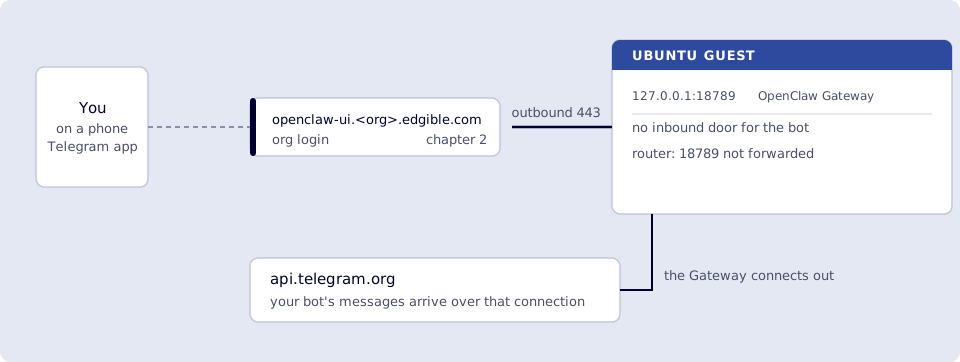
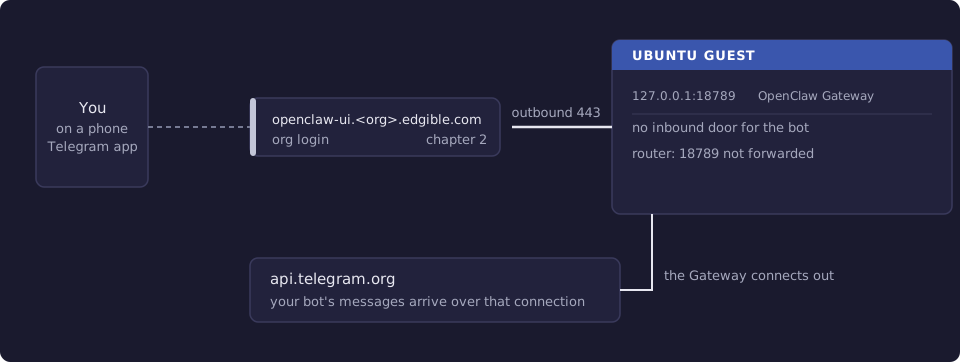
Where you run this: BotFather and the DM in the Telegram app on a phone; the token, config and logs on the Ubuntu guest.
5.1 The job
You create a bot, store its token on the VM, and DM that bot (not BotFather). OpenClaw replies. The Gateway connects out to api.telegram.org on TCP 443. There is no openclaw channels login telegram; you paste a BotFather token into config. Do not publish Telegram (or WhatsApp, Discord, Ollama) through Edgible. Do not port-forward 18789.
Control UI remains the cleaner place for /skill and exec approvals. WhatsApp is the bindable ACP client. Telegram is official Bot API.
Done when
- A bot from @BotFather; token on the Gateway host only (literal
123:AAH…, not$TELEGRAM_BOT_TOKEN). channels.telegram.apiRootis unset.openclaw channels status --probeshows Telegram working.- You DMed your bot, not BotFather.
- A DM to your bot gets an OpenClaw reply (identity ritual counts); pairing approved if asked.
- You can tell Gateway
/whoami(instant sender id) from/skill edgible whoami(Edgible CLI, through the model). - You did not publish a Telegram port through Edgible.
Need first: 1. OpenClaw on the VM (loopback Gateway) (Gateway + a model). Prove the skill in 4. OpenClaw skill for the Edgible CLI before Telegram /skill. Control UI through Edgible is optional for Telegram itself.
Not this chapter: putting the token in chat or Edgible; using Telegram as an Edgible app.
5.2 Create the bot
On your phone or web.telegram.org, open @BotFather (Telegram’s official bot).
/newbot, then pick a display name and a username ending inbot.- Copy the HTTP API token (
digits:AAH…). Treat it like a password. - Later:
/mybots→ your bot → API Token if you lost it. Revoke if it leaked.
Logging into Telegram as yourself does not put this token anywhere. OpenClaw only sees it when you config set it on the VM.
DM the bot you just created. BotFather will not forward your hello to OpenClaw.
5.3 Store the token on the VM
SSH into the Ubuntu guest (the Gateway host). Do not paste the token into OpenClaw chat, WhatsApp, or this guide’s examples in a ticket.
openclaw config set channels.telegram.enabled true
openclaw config set channels.telegram.botToken 'PASTE_TOKEN_HERE'
Do not set apiRoot. If you run openclaw config get channels.telegram.apiRoot and see Config path not found, that is correct. The default is https://api.telegram.org. Setting apiRoot to the full https://api.telegram.org/bot<TOKEN> URL makes grammY double the /bot… path. Logs then show:
telegram deleteMyCommands / setMyCommands failed: 404 Not Found
If you already set a bad apiRoot:
openclaw doctor --fix
openclaw config unset channels.telegram.apiRoot
apiRoot is only for a self-hosted Bot API server (file-size limits, blocked regions). Everyone else leaves it unset.
Check the token is real (do not paste the value into chat):
openclaw config get channels.telegram.botToken
Empty, missing, or $TELEGRAM_BOT_TOKEN means OpenClaw never got the secret. A 123:AAH… shape is what you want.
openclaw gateway restart
openclaw channels status --probe
You want Telegram enabled, configured, a bot username, token from config.
5.4 Pairing and first hello
Smoke test. Default DM policy is pairing. Send hello to your bot. On the VM:
openclaw pairing list telegram
openclaw pairing approve telegram <CODE>
Send hello again. You want a reply from OpenClaw (Gemini Flash, or whatever you set in 8).
If there is no reply: token, apiRoot, pairing, or the Gateway not running. openclaw doctor and channels status --probe first. There is still no Edgible hop on this path.
Verify
- A bot from @BotFather; token on the Gateway host only (literal
123:AAH…, not$TELEGRAM_BOT_TOKEN). -
channels.telegram.apiRootis unset. -
openclaw channels status --probeshows Telegram working. - You DMed your bot, not BotFather.
- A DM to your bot gets an OpenClaw reply (identity ritual counts); pairing approved if asked.
- You can tell Gateway
/whoami(instant sender id) from/skill edgible whoami(Edgible CLI, through the model). - You did not publish a Telegram port through Edgible.
5.5 Gateway commands vs the Edgible skill
Telegram slash commands that OpenClaw handles in the Gateway (no model) must be a standalone message:
| You send | What it is |
|---|---|
/whoami or /id |
Your Telegram sender id (telegram:123…). Instant. |
/status |
Runtime and selected model; a Fallback line if this session answered on a backup. |
/model status |
Endpoints / picker detail. |
/stop |
Abort a stuck OpenClaw turn. |
/skill edgible whoami |
The Edgible CLI edgible whoami. Full model turn (slow). |
If /whoami spins, a previous /skill turn is probably still queued (/stop then /id alone), or Telegram treated the slash as chat and the model loaded the Edgible skill because the description mentions whoami. A real /whoami is a short identity line in a second or two.
Your numeric user id is the number in /whoami. Use that for allowlists (id:123456789), not @username. If the command never comes back: @userinfobot /start, or openclaw pairing list telegram.
5.6 Which model, and 429s
This chapter assumes the chapter 1 Gemini Flash primary. A 429 is quota, not a broken Telegram install.
Failover (same turn, no resend) only if you set agents.defaults.model.fallbacks in 8. Models beyond free Gemini. A pinned Control UI /model is strict, so leave the picker on Default.
In a DM, a switch can show:
↪️ Model Fallback: ollama/qwen2.5:7b (selected google/…; rate_limit)
Groups suppress that notice; /status still has the state.
/skill is slow when the model is slow. edgible whoami on the VM is milliseconds.
openclaw config get agents.defaults.model
You want primary = Flash until you change it in chapter 8.
5.7 Logs do not echo your Telegram text
Default openclaw logs --follow is info. Inbound message bodies are not printed (privacy). A successful /whoami can be almost silent. Follow logs on the VM, not the Mac.
openclaw channels logs --channel telegram
openclaw channels status --probe
To see raw updates while debugging, raise file logs then put them back:
openclaw config set logging.level debug
openclaw gateway restart
openclaw logs --follow
Then:
openclaw config set logging.level info
openclaw gateway restart
If debug still shows nothing when you send a DM, the Gateway is not receiving Telegram (wrong host, another poller, stale update offset). openclaw gateway status and ls ~/.openclaw/state/telegram/.
5.8 /skill edgible from Telegram
You already installed the skill in chapter 4. After pairing works, send:
/skill edgible whoami
You want the same Profile / Environment / Account / Organization as the VM edgible whoami. If that never ran in Control UI, go back to chapter 4. Telegram /skill is the slower copy of the same OpenClaw turn.
Do not confuse with Gateway /whoami (your Telegram id).
5.9 Optional: stop WhatsApp
Same OpenClaw Gateway; WhatsApp is a channel. Pause:
openclaw config set channels.whatsapp.enabled false
openclaw gateway restart
Unlink the phone session:
openclaw channels logout --channel whatsapp
Telegram is unchanged.
5.10 Optional: host bash (! / /bash)
Off by default. It is a host shell from chat, not the Edgible skill.
openclaw config set commands.bash true
openclaw config set tools.elevated.enabled true
openclaw config set tools.bash.enabled true
openclaw config set tools.elevated.allowFrom.webchat '["*"]' --strict-json
openclaw config set tools.elevated.allowFrom.telegram '["id:YOUR_TELEGRAM_USER_ID"]' --strict-json
openclaw gateway restart
Standalone message: ! edgible whoami or /bash edgible whoami. Limit Telegram to your id:. Do not enable this in a group.
Next
6. WhatsApp linked device for OpenClaw if you want a linked-device client, or skip to 7. Cursor Agent from OpenClaw on the Edgible site. Paid / local models: 8. Models beyond free Gemini. Series: README.