1. The site on the VM
A folder of files, served by nginx on loopback, with nothing on the internet yet.
1.0 Why
Hello World from Start here proved that publishing works, but it is a single file the Edgible CLI wrote for you. A real site is a directory: an index.html, a stylesheet, images, maybe a few hundred files a generator produced. This chapter puts that directory on the VM and serves it, so the next chapter has something worth a public hostname.
Nothing here is specific to how you build the site. A folder of static files is a folder of static files, whether it came out of Astro, Hugo, Eleventy, a Vite build, or a text editor. The container serves whatever is in it and does not care.
The site binds to 127.0.0.1:8080, not 0.0.0.0. Anything on your home network could reach 0.0.0.0, and you would be relying on the router to keep the rest of the internet out. Loopback plus the Edgible serving agent is the pattern every guide here uses: one process, reachable locally, published deliberately.
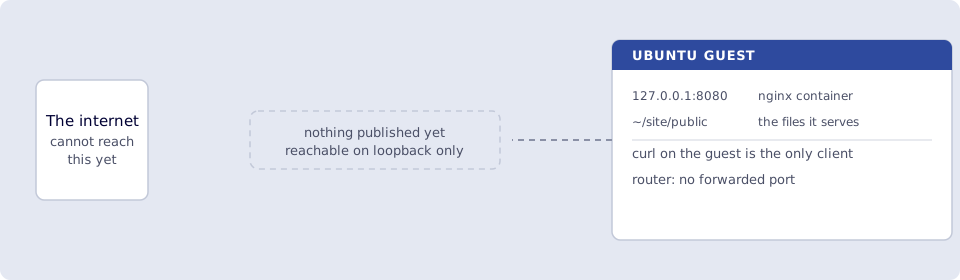
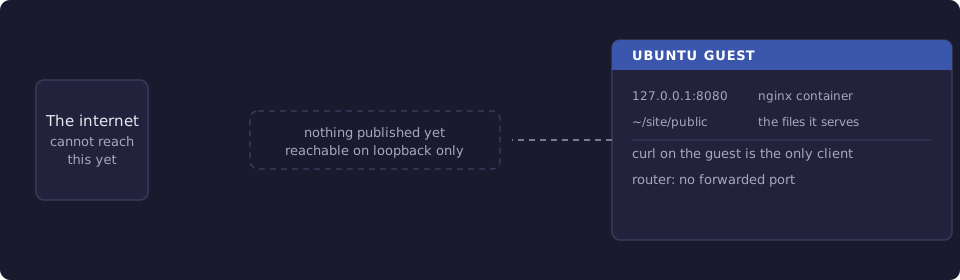
Where you run this: everything on the Ubuntu guest. Building the site can happen wherever you normally build it, including your laptop.
1.1 The job
You put a directory of static files on the guest, run nginx in Docker against it, and confirm it answers on loopback and only on loopback.
Done when
~/site/public/index.htmlexists on the guest.docker compose -f ~/site/docker-compose.yml psshows the container running.curl http://127.0.0.1:8080/returns your page.ss -ltnp | grep 8080shows127.0.0.1:8080, not0.0.0.0:8080.- Port
8080is not forwarded on the router.
Need first: Start here. edgible whoami works, device minipc is healthy, https://hello-world.<org>.edgible.com loads on cellular. Docker is already on the guest from that chapter. Leave hello-world running.
Not this chapter: an Edgible app for this site, a hostname, analytics, or uptime monitoring.
1.2 Get the files onto the guest
Three ways, in increasing order of how real they are.
Write a placeholder by hand, which is enough to finish this chapter and the next:
mkdir -p ~/site/public
cat > ~/site/public/index.html <<'HTML'
<!doctype html>
<html lang="en">
  <head><meta charset="utf-8"><title>My site</title></head>
  <body><h1>My site</h1><p>Served from a box I own.</p></body>
</html>
HTML
Copy a build from your laptop, which is what you will do from then on. Run this on the laptop, not the guest. It uses the host 2222 to guest 22 forward from Start here, 1.5, because a NAT guest has no address of its own on your LAN:
rsync -av --delete -e 'ssh -p 2222' ./dist/ ubuntu@127.0.0.1:~/site/public/
Use your own guest username, and if the guest is a separate machine on your LAN rather than a VM, its own address and the default SSH port.
Or build on the guest, if the generator runs there and you would rather not copy anything. That needs the toolchain installed on the guest, which is more to keep updated, so most people copy.
Smoke test. ls ~/site/public lists your files, and index.html is one of them at the top level rather than inside a nested directory. A build that produces dist/ copied wholesale often lands as ~/site/public/dist/index.html, which serves a directory listing or a 404 instead of the page. The trailing slash on ./dist/ in the rsync above is what prevents that.
1.3 Serve it with nginx
One container, one bind mount, on the guest:
cat > ~/site/docker-compose.yml <<'YAML'
services:
  site:
    image: nginx:alpine
    container_name: site
    restart: unless-stopped
    ports:
      - "127.0.0.1:8080:80"
    volumes:
      - ./public:/usr/share/nginx/html:ro
YAML

cd ~/site && docker compose up -d
Two details worth understanding rather than copying.
127.0.0.1:8080:80 publishes the container port to loopback only. Without the 127.0.0.1: prefix, Docker binds 0.0.0.0 and edits the firewall to allow it, so the site would answer to every device on your network. The Edgible serving agent runs on this same guest and reaches loopback fine.
The bind mount is read-only (:ro) and points at the directory rather than baking files into an image. Updating the site is then a copy and nothing else: no rebuild, no restart, no downtime. If you would rather ship an image, that works too, but you give up the one-command update.
Smoke test. On the guest:
curl -s http://127.0.0.1:8080/ | head -5
ss -ltnp | grep 8080
The first prints the top of your HTML. The second must show 127.0.0.1:8080. If it shows 0.0.0.0:8080, the 127.0.0.1: prefix is missing from the compose file: fix it and run docker compose up -d again.
A 403 from curl means nginx found the directory but no index.html at its root, which is the nested-directory mistake from 1.2. A connection refused means the container is not running: docker compose logs site says why.
Verify
-
~/site/public/index.htmlexists on the guest. -
docker compose -f ~/site/docker-compose.yml psshows the container running. -
curl http://127.0.0.1:8080/returns your page. -
ss -ltnp | grep 8080shows127.0.0.1:8080, not0.0.0.0:8080. - Port
8080is not forwarded on the router.
Next
2. Publish the site gives this directory a public HTTPS hostname and loads it on a phone. Series: README.