5. A webhook a stranger can hit
An unauthenticated caller reaches your box, without touching the router.
5.0 Why
Chapter 3 published the None hostname and chapter 4 proved n8n runs. This chapter combines them. Until now every success has been you, logged in as yourself. A webhook caller is different: Stripe, GitHub, a phone on cellular. If that call cannot land, the integrations people want n8n for will not work.
Make the call from outside. Loading the URL from the VM, or from a laptop on the same Wi‑Fi, tests almost nothing. The hostname matters too: the same path on the org editor hostname stops at the Edgible login, which is correct behaviour and not the test. Only the n8n-hooks hostname on None answers unauthenticated callers. That is the shape of the demo: HTTPS in from anywhere, with no forwarded port and no VPN enrolment for the caller.
The None auth mode accepts anyone who learns the path. Keep the path unguessable, return nothing sensitive, and unpublish when you are finished.
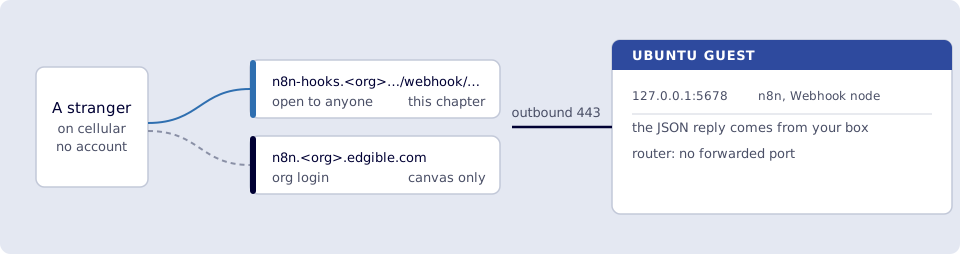
Where you run this: build the workflow in the n8n editor on the org hostname; make the call from a phone on cellular or an off-LAN laptop shell.
5.1 The job
You add a Webhook node whose production URL is on n8n-hooks (None), not the org editor host. You hit it from cellular or any machine that is not the VM. n8n responds with JSON. That is what GitHub/Stripe would do next; you do not need them for the smoke test.
Done when
- The Webhook node shows a production URL on
https://n8n-hooks.<org>.edgible.com/webhook/…with no:5678and nolocalhost. - The workflow is Active.
- A GET in the phone browser (cellular) or
curloff the LAN returns JSON such as{"ok":true}. - Executions recorded the call.
- The n8n app is still
org, andn8n-hooksis stillNone. Hitting the editor host with/webhook/…is not the test. - Hello World still loads. Port
5678not forwarded. - You deactivated the smoke webhook (or accept that the path is public).
Need first: 3. Public webhook hostname (WEBHOOK_URL set, hooks cert issued) and the canvas from 2.
Not this chapter: OpenClaw, Telegram bots, or leaving a privileged workflow on a public path.
5.2 Build it
In the org editor (n8n.<org>…), not the hooks hostname:
- Add workflow (new, not the cron).
- Add Webhook.
- HTTP Method: GET (phone browser).
- Path: something unguessable, e.g.
edgible-smoke-<random>(or keep n8n’s random path). - Respond is a dropdown on the Webhook node’s Parameters tab. Set it to Using 'Respond to Webhook' Node. Immediately only returns Workflow got started.
- Click the + on the right of the Webhook (or the canvas +). In the search box type
respond. Pick Respond to Webhook.
Do not look for Edit Fields / Set inside the Webhook panel. Those are other nodes. If you want them anyway, searchedit fieldsorset(official name: Edit Fields (Set)), under Core / transform, not Apps. - On Respond to Webhook: Respond With → JSON. Body:
{ "ok": true, "via": "edgible" }
- Save. At the top of the Webhook node, switch to Production URL (not Test). Copy that URL. It must start with
https://n8n-hooks.from chapter 3. - Publish / toggle Active (production webhooks only exist when the workflow is active).
If the URL still shows localhost:5678 or :5678, WEBHOOK_URL is wrong. Go back to 3.3 and recreate the container.
5.3 Hit it from outside the VM
Smoke test. Phone on cellular: paste the production URL in the browser. You want the JSON (or a download of it). Wi‑Fi on the same LAN as the VM is not this test.
Or from a laptop on cellular / another network:
curl -sS "https://n8n-hooks.<org>.edgible.com/webhook/edgible-smoke-YOURPATH"
Use the exact production URL from the node. HTTP 200 and ok is success.
n8n Executions should show the request.
Deactivate the workflow when you are finished. A public GET that returns only ok is still a public endpoint; do not attach “delete all my disks” to a None hostname.
Verify
- The Webhook node shows a production URL on
https://n8n-hooks.<org>.edgible.com/webhook/…with no:5678and nolocalhost. - The workflow is Active.
- A GET in the phone browser (cellular) or
curloff the LAN returns JSON such as{"ok":true}. - Executions recorded the call.
- The n8n app is still
org, andn8n-hooksis stillNone. Hitting the editor host with/webhook/…is not the test. - Hello World still loads. Port
5678not forwarded. - You deactivated the smoke webhook (or accept that the path is public).
Next
That’s this series for the demo. Teardown: 6. Tear down n8n. Index. Edgible VM setup lives in Start here, on the same box. An agent instead: OpenClaw on Edgible; do not wire n8n to OpenClaw for this demo. A published model: LLM on Edgible.